¶ Your brief
When an officer approves the application, the service must enroll the learner at KEZA. This is a push: Irembo sends data and KEZA stores it. The call is made from a workflow step (officer approval), so the endpoint uses the PMAPPING adapter and is called on /push/sync. New ideas: PMAPPING, a JSON body, and the applicationNumber.
KEZA API guide · the slice you need
POST /v1/enrollments
Authorization: Bearer <token>
{ "applicationNumber", "programCode", "centerCode",
  "learner": { "nationalId", "fullName", "phone" } }

201  { "enrollmentId", "status": "CONFIRMED", "applicationNumber", "centerCode", "startDate" }
409  { "code": "ALREADY_ENROLLED", "enrollmentId", "status": "CONFIRMED" }
422  { "code": "VALIDATION_ERROR" }
¶ How your teacher does it · Mocks → New Mock
1 · Request: POST /victor/keza/v1/enrollments
2 · Responses (the first matching rule wins)
Rule 1 · Already enrolled (Eric)
| Match on | Key | Operator | Value | |
|---|---|---|---|---|
| If | Header | Authorization | equals | Bearer keza-victor-token-7f3a |
| and | Body | learner.nationalId | equals | 1199770098765432 |
Respond with 409 Body type json
{
  "code": "ALREADY_ENROLLED",
  "message": "Learner already has an active enrollment for this program.",
  "enrollmentId": "ENR-2026-0042",
  "status": "CONFIRMED"
}
Rule 2 · New enrollment (Aline)
| Match on | Key | Operator | Value | |
|---|---|---|---|---|
| If | Header | Authorization | equals | Bearer keza-victor-token-7f3a |
| and | Body | learner.nationalId | equals | 1199880012345678 |
| and | Body | programCode | equals | DATA_ANALYTICS |
| and | Body | — | raw JSONPath | $.applicationNumber |
Respond with 201 Body type jsonDynamic response ON
{
  "enrollmentId": "ENR-2026-0107",
  "status": "CONFIRMED",
  "applicationNumber": "{{jsonPath request.body '$.applicationNumber'}}",
  "centerCode": "{{jsonPath request.body '$.centerCode'}}",
  "startDate": "2026-10-05"
}
Rule 3 · Invalid body
| Match on | Key | Operator | Value | |
|---|---|---|---|---|
| If | Header | Authorization | equals | Bearer keza-victor-token-7f3a |
Respond with 422 Body type json
{
  "code": "VALIDATION_ERROR",
  "message": "applicationNumber, programCode and learner.nationalId are required."
}
Otherwise — when no rule above matches
Respond with 401 Body type json
{
  "code": "UNAUTHORIZED",
  "message": "Missing or invalid bearer token."
}
3 · Label
| Field | Value |
|---|---|
| Name | Victor KEZA Enrollments |
| Code | VICTOR_KEZA_ENROLLMENTS |
| Service | KEZA |
| Category | victor-course |
| Active | ✔ served by the mock server right away |
- Body conditions use a JSONPath filter,
$.[?(@.learner.nationalId == '…')]. In the portal you pick Body, fieldlearner.nationalId, equals, and the portal writes this for you. - Eric comes first and answers 409 ALREADY_ENROLLED (Eric enrolled last year).
- Aline’s answer is dynamic:
{{jsonPath request.body '$.applicationNumber'}}echoes values from the body KEZA received. - An authenticated body that matches neither learner gets 422.
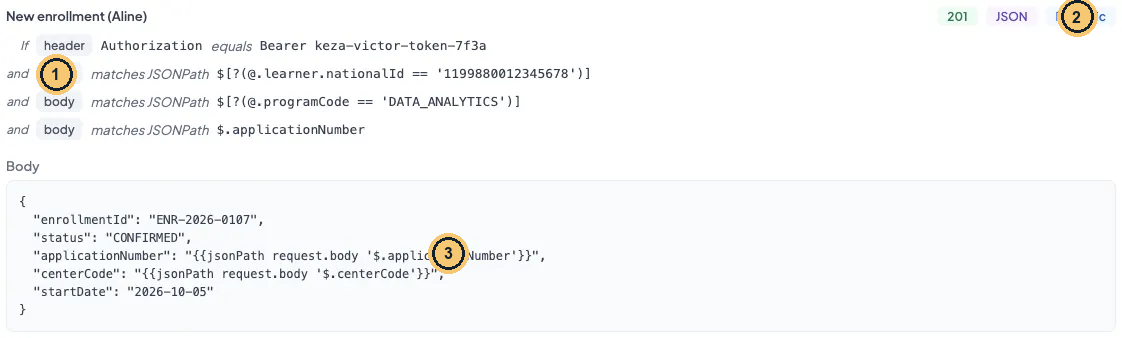
Enrollment rule with body conditions and a dynamic response
- Body conditions use JSONPath: the enrollment must be for Aline and DATA_ANALYTICS.
- Dynamic: the body is a template.
- {{jsonPath request.body …}} copies values from the incoming request.
¶ How your teacher does it · Endpoints → New Endpoint
| Field | Value | |
|---|---|---|
| **Endpoint adapter *** | PMAPPING (push) |
locked after save |
| **Endpoint code *** | VICTOR_KEZA_ENROLLMENT_PUSH |
locked after save |
| **Endpoint url *** | http://mock-service-engine.apps:8000/victor/keza/v1/enrollments |
|
| **Endpoint type *** | PUSH (set by the adapter) |
|
| **Endpoint name *** | Victor KEZA Enrollment |
|
| **Partner *** | KEZA |
locked after save |
| Active | ON |
|
| **Endpoint description *** | Victor course: enroll an approved applicant at KEZA (push, JSON body). |
**Endpoint Mapping ***
{
  "method": "POST",
  "body": {
    "applicationNumber": applicationNumber,
    "programCode": programCode,
    "centerCode": centerCode,
    "learner": {
      "nationalId": nationalId,
      "fullName": firstName & " " & lastName,
      "phone": phoneNumber
    }
  },
  "auth": {
    "type": "USER_CREDENTIALS",
    "baseUrl": "http://mock-service-engine.apps:8000",
    "parameters": {
      "authPath": "/victor/keza/v1/auth/login",
      "bodyTemplate": { "username": "irembo-integration", "password": "Keza@2026" }
    },
    "tokenConfig": {
      "storageKey": "VICTOR_KEZA_TOKEN",
      "headerName": "Authorization",
      "tokenPrefix": "Bearer",
      "expiryBuffer": 300,
      "extractPath": "data.token"
    }
  }
}
- POST: the partner verb (push defaults to POST anyway).
- body: any JSON. The engine sends it as
application/json. - Nest objects freely to match the partner’s shape.
- Build values: the two name fields are joined into KEZA’s
fullName. - Lines 13–27: the same USER_CREDENTIALS auth block as Lesson 1.5, reused unchanged (same storage key, so the token is shared).
Secrets · training literal. Hard-coded only because KEZA is a training mock. In a real integration use the environment variable instead: Keza@2026 → "${KEZA_PASSWORD}" (the whole quoted string, nothing before or after; see Lesson 3.4).
¶ Mapping test (request pass only) · mapping/test · VICTOR_KEZA_ENROLLMENT_PUSH
HTTP 200 captured on staging · 26 Sep 2026
1 · Request (curl)
curl -s -X POST "https://integration-gateway.staging.iremboinc.com/integration/v1/endpoints/VICTOR_KEZA_ENROLLMENT_PUSH/mapping/test" \
  -H "Authorization: Bearer $TOKEN" \
  -H "portal: integration-management-portal" \
  -H "Content-Type: application/json" \
  -d '{
  "applicationNumber": "C260926081500VICTR1",
  "programCode": "DATA_ANALYTICS",
  "centerCode": "KZ-GSB-01",
  "nationalId": "1199880012345678",
  "firstName": "Aline",
  "lastName": "Mukamana",
  "phoneNumber": "0788000111"
}' | jq '.data'
2 · What the engine would send
{
  "method": "POST",
  "body": {
    "applicationNumber": "C260926081500VICTR1",
    "programCode": "DATA_ANALYTICS",
    "centerCode": "KZ-GSB-01",
    "learner": {
      "nationalId": "1199880012345678",
      "fullName": "Aline Mukamana",
      "phone": "0788000111"
    }
  },
  "auth": {
    "type": "USER_CREDENTIALS",
    "baseUrl": "http://mock-service-engine.apps:8000",
    "parameters": {
      "authPath": "/victor/keza/v1/auth/login",
      "bodyTemplate": {
        "username": "irembo-integration",
        "password": "Keza@2026"
      }
    },
    "tokenConfig": {
      "storageKey": "VICTOR_KEZA_TOKEN",
      "headerName": "Authorization",
      "tokenPrefix": "Bearer",
      "expiryBuffer": 300,
      "extractPath": "data.token"
    }
  }
}
3 · What to notice
- The body has exactly KEZA’s shape: flat form fields became a nested
learnerobject. - Always run the mapping test before a real push: a push really creates data at the partner.
Gotcha · Push uses a different gateway on staging
In production the application engine calls push when the service workflow reaches the integration step. On staging you can call it yourself, but only through the admin gateway:
https://admin-gateway.staging.iremboinc.com/integration/v1/push/syncwith headerportal: administration-management-portal. The integration gateway answers push with 500NoResourceFoundException.Staging only. Use this admin-gateway path for training calls on staging. Never script it, share it with a caller, or use it on production: there, only the application engine pushes.
¶ Aline (new enrollment) · push/sync · VICTOR_KEZA_ENROLLMENT_PUSH
HTTP 200 1.00 s captured on staging · 26 Sep 2026
1 · Request (curl)
curl -s -X POST "https://admin-gateway.staging.iremboinc.com/integration/v1/push/sync" \
  -H "Authorization: Bearer $TOKEN" \
  -H "portal: administration-management-portal" \
  -H "Content-Type: application/json" \
  -d '{
  "endpointCode": "VICTOR_KEZA_ENROLLMENT_PUSH",
  "callerId": "victor-course",
  "requester": "victor-course",
  "applicationNumber": "C260926081500VICTR1",
  "payload": {
    "applicationNumber": "C260926081500VICTR1",
    "programCode": "DATA_ANALYTICS",
    "centerCode": "KZ-GSB-01",
    "nationalId": "1199880012345678",
    "firstName": "Aline",
    "lastName": "Mukamana",
    "phoneNumber": "0788000111"
  }
}' | jq
2 · Real response
{
  "status": true,
  "responseCode": "PUSH_SYNC",
  "responseMessage": "PUSH_SYNC",
  "data": {
    "id": "574396ea-9c0f-4bb2-adeb-514bd4328b4a",
    "endpointCode": "VICTOR_KEZA_ENROLLMENT_PUSH",
    "callerId": "victor-course",
    "message": "{\n  \"enrollmentId\": \"ENR-2026-0107\",\n  \"status\": \"CONFIRMED\",\n  \"applicationNumber\": \"C260926081500VICTR1\",\n  \"centerCode\": \"KZ-GSB-01\",\n  \"startDate\": \"2026-10-05\"\n}",
    "adapterCode": "PMAPPING",
    "applicationDetails": null
  },
  "timestamp": "2026-09-26T09:51:37.715660359",
  "traceId": "6ab779899ffc6ff7cb904ed37b6d344b"
}
3 · Decoded data.message
{
  "enrollmentId": "ENR-2026-0107",
  "status": "CONFIRMED",
  "applicationNumber": "C260926081500VICTR1",
  "centerCode": "KZ-GSB-01",
  "startDate": "2026-10-05"
}
4 · What to notice
PUSH_SYNCandadapterCode PMAPPING: a successful push.applicationDetailsis null because this mapping has noresponse.transform; it holds the transformed answer only when one is defined.- The partner answer is in
data.message(notdata.responseas for fetch). - The envelope has
applicationNumberat the top: required for every push.
¶ Eric (already enrolled) · push/sync · VICTOR_KEZA_ENROLLMENT_PUSH
HTTP 500 1.03 s captured on staging · 26 Sep 2026
1 · Request (curl)
curl -s -X POST "https://admin-gateway.staging.iremboinc.com/integration/v1/push/sync" \
  -H "Authorization: Bearer $TOKEN" \
  -H "portal: administration-management-portal" \
  -H "Content-Type: application/json" \
  -d '{
  "endpointCode": "VICTOR_KEZA_ENROLLMENT_PUSH",
  "callerId": "victor-course",
  "requester": "victor-course",
  "applicationNumber": "C260926081600VICTR2",
  "payload": {
    "applicationNumber": "C260926081600VICTR2",
    "programCode": "DATA_ANALYTICS",
    "centerCode": "KZ-GSB-01",
    "nationalId": "1199770098765432",
    "firstName": "Eric",
    "lastName": "Habimana",
    "phoneNumber": "0788000111"
  }
}' | jq
2 · Real response
{
  "httpStatus": 500,
  "exception": "PartnerException",
  "responseCode": "PARTNER_ERROR_PUSH-VICTOR_KEZA_ENROLLMENT_PUSH-C260926081600VICTR2",
  "responseMessage": "{\n  \"code\": \"ALREADY_ENROLLED\",\n  \"message\": \"Learner already has an active enrollment for this program.\",\n  \"enrollmentId\": \"ENR-2026-0042\",\n  \"status\": \"CONFIRMED\"\n}",
  "fieldErrors": null
}
3 · What to notice
- KEZA’s 409 became 500 PARTNER_ERROR_PUSH--.
- Yet Eric is enrolled (
status: CONFIRMED). In Lesson 4.3 you will accept this answer as success.
¶ The application number makes a push idempotent
The engine identifies a push by partner + PUSH + endpoint code + applicationNumber. This protects KEZA from double enrollments when a workflow retries:
Idempotency rules for push
| You send again… | Previous request status | What the engine does |
|---|---|---|
| the same payload | SUCCESS | Returns the stored result. KEZA is not called again. |
| the same payload | FAILURE | Re-runs the same request; the retry count goes up by 1. |
| a changed payload | CREATED (never completed) | Resubmits the same request with the new payload. |
| a changed payload | SUCCESS or FAILURE | Creates a new request and calls KEZA. |
¶ Check yourself
You push Aline twice with the same application number and the same payload. The first push succeeded. What happens on the second?
- A. KEZA receives a second enrollment request
- B. The engine answers 409 CONFLICT itself
- C. The engine re-runs it with retry count +1
- D. The engine returns the stored success
Show the answer
D. Same idempotency key and same payload after SUCCESS: the engine returns the stored result and KEZA is not called. A re-run with retry +1 happens only after a FAILURE.
Your turn · push with your own numbers
Create
${YOUR_FIRST_NAME}_KEZA_ENROLLMENT_PUSH(PMAPPING: a workflow calls it) on/${your_first_name}/keza/v1/enrollmentsand push Aline with a new application number, for exampleC2609260900${FIRST4}01with the first four letters of your name (Aline →C2609260900ALIN01). Replace the variables before saving. Push again with the same number: confirm no new request appears in Requests.
← 2.2 Headers, query and JSONata functions: training centres · 3.1 API key header (TOKEN): programme catalogue →