¶ Every call leaves a record
Each fetch or push creates a Request. It is your black box: what the caller sent, what the engine sent to the partner, what came back, and every retry. Open Requests in the top navigation (you met the list in Lesson 1.6).
Request statuses
| Status | Meaning | Typical cause |
|---|---|---|
| CREATED | Received, not finished | Still running, or a sync push rejected by the mapping (it stays CREATED, not FAILURE) |
| SUCCESS | Partner answered and the mapping accepted it | Including 4xx turned into success by successCondition |
| FAILURE | Partner error, timeout, or mapping rejection (fetch) | Read the error code and the trace |
| CANCELLED | Closed by a person | Set manually from Request info; not offered as a list filter |
¶ Find one request fast
A service team says: “Application C260926081600VICTR2 failed at KEZA.”
¶ Step · 1 · Search
Choose App Number in the Search selector and paste the number (at least 2 characters). You can also search by endpoint code, partner code or service name.
¶ Step · 2 · Narrow
Use Adapter type (PUSH/FETCH), Endpoint and Request status filters.
¶ Step · 3 · Read the row
Response details shows the error code and the first 100 characters of the message: often enough to diagnose.
¶ Step · 4 · View
Opens Request info: summary, status, retries, response, trace and original payload.
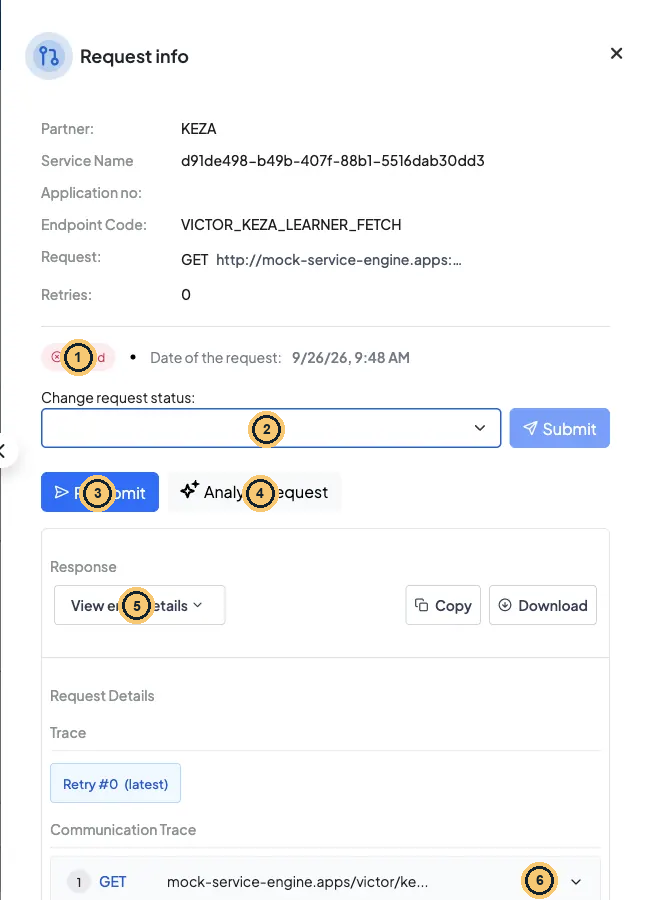
Request info for a failed fetch (unknown learner)
- FAILURE status.
- Change request status: CANCELLED or SUCCESS from here.
- Resubmit is shown on every FAILURE, but for a fetch it fails with ADAPTER_NOT_FOUND_EXCEPTION: ask the caller to fetch again.
- Analyze Request: AI explanation of the failure (staging).
- View error details: the partner’s answer.
- The partner answered 404 in the Communication Trace.
Reading Request info
| Section | What it tells you |
|---|---|
| Summary | Partner, service, application number, endpoint code, configured URL and the Retries count |
| Response → View error details | The error message (for partner errors: the partner’s body) |
| Trace → Retry #N | One tab per attempt; the newest is marked (latest) |
| Communication Trace | The partner call(s) of that attempt. Login and token calls are not listed here: find them in Kibana (Lesson 6.3). Expand a row for URL, headers (Authorization is redacted), payload, response headers, body and error. For mock calls the response header Matched-Stub-Name tells you which mock and rule answered |
| Original Payload | Exactly what the caller sent in payload |
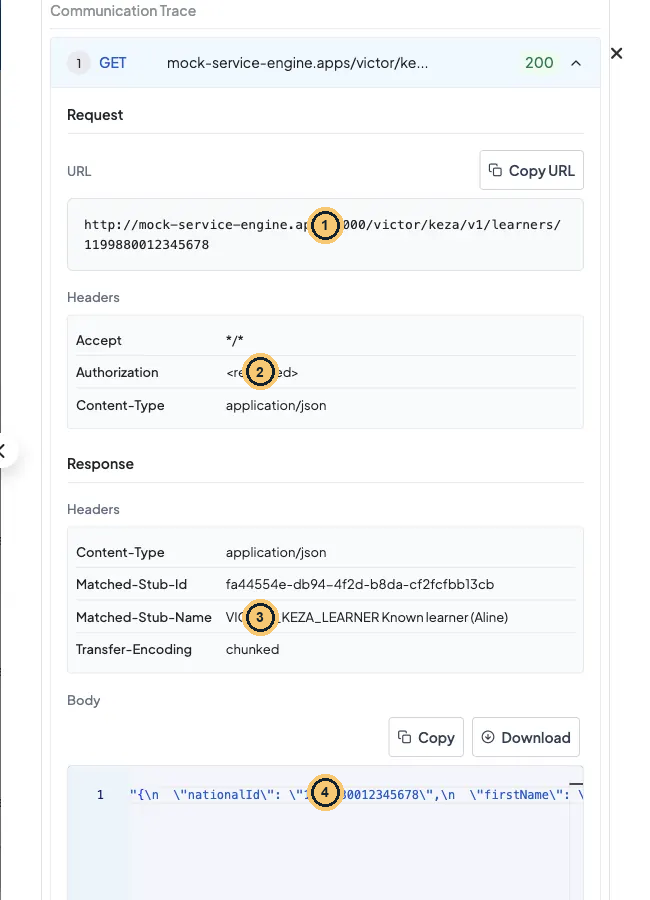
An expanded Communication Trace call
- The exact URL the engine called, placeholders filled.
- Outbound headers; Authorization is redacted.
- Matched-Stub-Name: which mock and rule answered (mock calls only).
- The raw partner body.
¶ Resubmit, cancel or mark as success
Operator actions
| Action | Where | Use it when | Limits |
|---|---|---|---|
| Resubmit | Request info (FAILURE only) | The cause is fixed (mapping corrected, partner back up) | Push only. A fetch resubmit fails with ADAPTER_NOT_FOUND_EXCEPTION: ask the caller to fetch again |
| Resubmit selected | Requests list, tick FAILURE rows | Many async pushes failed during an outage | Only async requests (with a callback URL) are queued; sync ones are skipped as invalid ids, although the toast still says success. Resubmit sync pushes one by one |
| Change request status → CANCELLED | Request info | The request must never be retried (duplicate, withdrawn application) | CREATED/FAILURE → CANCELLED or SUCCESS; CANCELLED → SUCCESS |
| Change request status → SUCCESS | Request info | The partner confirmed out of band that the data arrived | Leaves an audit trail with your name. Use sparingly |
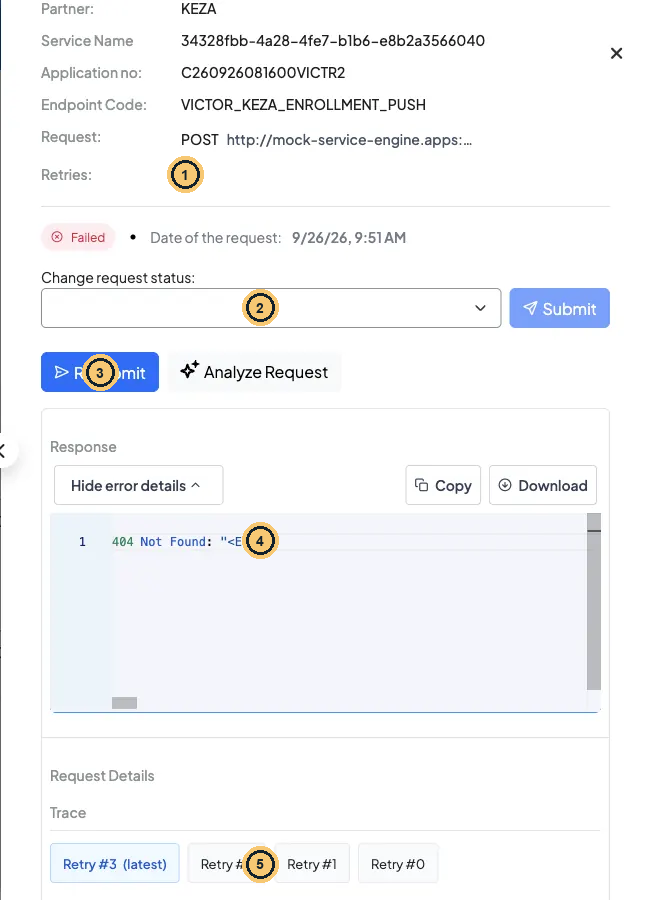
A failed enrollment push after three resubmits
- Retries: 3: the request was resubmitted three times.
- Change request status: CANCELLED or SUCCESS, with an audit trail.
- Resubmit: FAILURE pushes only.
- The partner error of the latest attempt.
- One trace tab per attempt: Retry #0 is the first try.
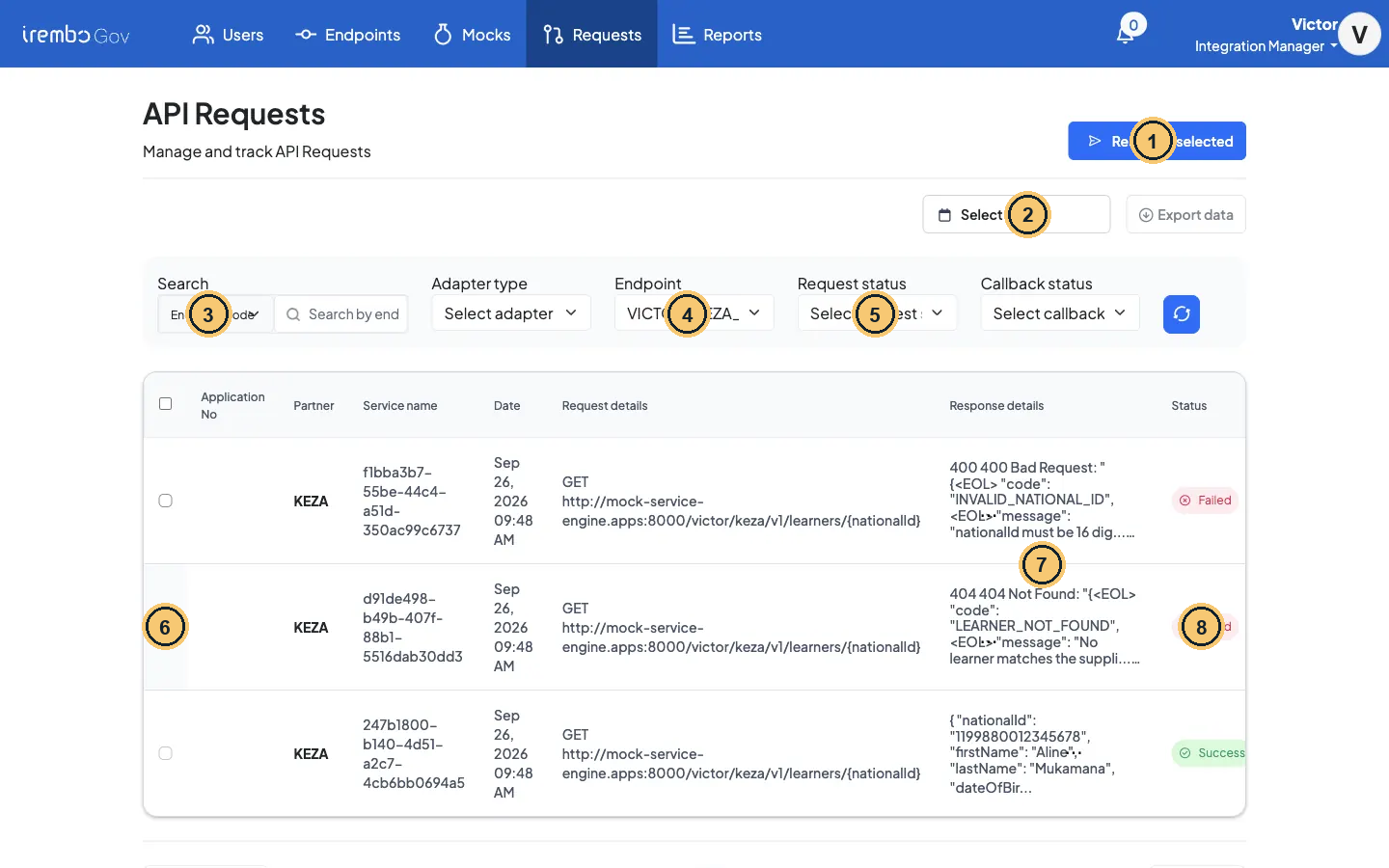
Resubmit selected: tick FAILURE rows, then queue them
- Resubmit selected: async pushes only.
- Date range + Export data (CSV of the current filters).
- Search by App Number, Service Name, Partner Code or Endpoint Code.
- Endpoint and Adapter type filters.
- Request status (CANCELLED is not offered).
- Only FAILURE rows can be ticked.
- Response details: error code + the first 100 characters.
- Status pill.
Gotcha · Resubmit re-sends the stored payload
There is no way to edit a payload before resubmitting. If the data was wrong, fix it at the source and let the service send a new request. Resubmit re-runs the current mapping, so a mapping fix does apply. A sync push stuck in CREATED has no Resubmit button: when the caller re-sends it with a corrected payload, the engine resubmits the same request (retry count +1).
¶ Check yourself
A fetch request for Aline is in FAILURE because KEZA was down. KEZA is back. What do you do?
- A. Ask the caller to trigger the fetch again
- B. Click Resubmit on the request’s detail page
- C. Tick the row and use Resubmit selected
- D. Wait for the automatic retry to pick it up
Show the answer
A. Retry only works for push. Automatic retry also covers push only. A fetch must be called again.
¶ Check yourself
A sync push was rejected by your failureCondition. Which status does its Request have?
- A. FAILURE
- B. CANCELLED
- C. CREATED
- D. SUCCESS
Show the answer
C. An engine quirk: a sync push rejected by the mapping stays CREATED. A fetch rejected the same way is FAILURE. Filter on both when you hunt for problems.
Your turn · read your own black box
In Requests, search by App Number for your 409 push from Lesson 2.3 (or any push you made with
${FIRST4}in the number). Open View.Done when: your evidence pack has the Request status, the Retries count, the Matched-Stub-Name of the partner call and the number of calls in the Communication Trace. Explain in one line why the status is what it is.
← 5.2 Repeated rows: one call per guardian · 6.2 Troubleshooting playbook →