¶ Your brief
Create an endpoint that takes a nationalId and a programCode from the form, logs in to KEZA, and calls the eligibility API with the token. It is used on the form, so it is an FMAPPING endpoint. Your code is ${YOUR_FIRST_NAME}_KEZA_ELIGIBILITY_FETCH; below, the worked example (How your teacher does it) builds the reference VICTOR_KEZA_ELIGIBILITY_FETCH.
Your tech notes · Step 0 · Check your grants
The Integration Manager role is not enough on its own. You also need read/create grants on ADAPTER, ORGANIZATION (partner KEZA), ENDPOINT, MOCK and JOB. Without them the Endpoint adapter dropdown is empty and Partner is read-only. The screenshot below is an illustration of the granted state: its dropdown values were filled in by hand, because the capture account lacked those grants.
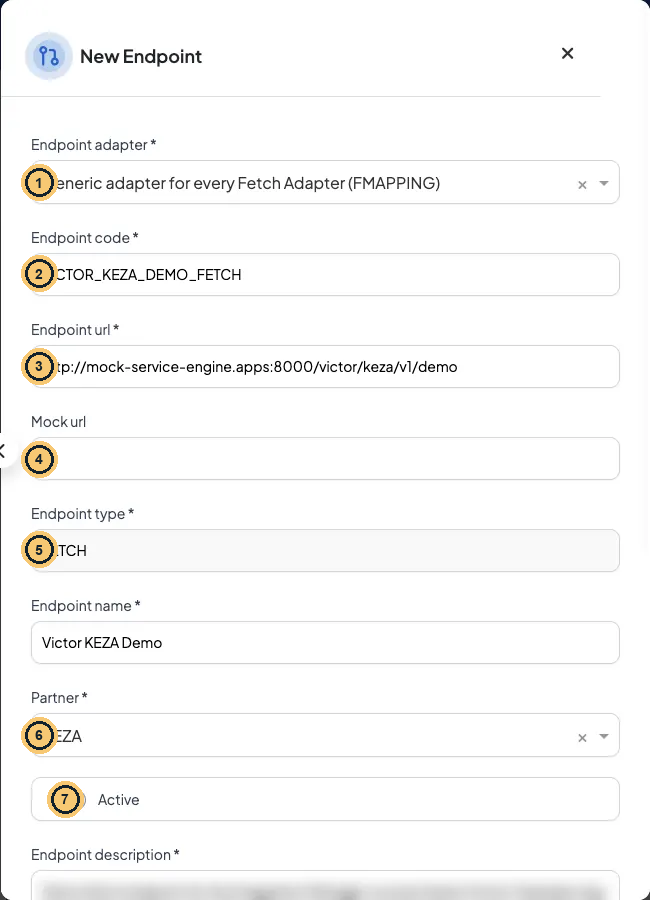
New Endpoint form (top half), illustration: dropdown values filled in; description blurred
- Endpoint adapter: the generic FMAPPING (fetch) or PMAPPING (push) adapter. Illustration: the dropdown values were filled in to show what a granted account sees; without ADAPTER/ORGANIZATION grants this dropdown is empty.
- Endpoint code: permanent and case-sensitive. Callers send it as endpointCode.
- Endpoint url: partner URL with {placeholders}; no $, %, ~, @, : or spaces in the path.
- Mock url (optional): used only when Use mock is on.
- Endpoint type: filled from the adapter.
- Partner: the organisation that owns the API.
- Active switch.
¶ How your teacher does it · Endpoints → New Endpoint
| Field | Value | |
|---|---|---|
| **Endpoint adapter *** | FMAPPING (fetch) |
locked after save |
| **Endpoint code *** | VICTOR_KEZA_ELIGIBILITY_FETCH |
locked after save |
| **Endpoint url *** | http://mock-service-engine.apps:8000/victor/keza/v1/eligibility |
|
| **Endpoint type *** | FETCH (set by the adapter) |
|
| **Endpoint name *** | Victor KEZA Eligibility |
|
| **Partner *** | KEZA |
locked after save |
| Active | ON |
|
| **Endpoint description *** | Victor course: check KEZA eligibility with USER_CREDENTIALS login. |
**Endpoint Mapping ***
{
  "method": "GET",
  "query": {
    "nationalId": nationalId,
    "program": programCode
  },
  "auth": {
    "type": "USER_CREDENTIALS",
    "baseUrl": "http://mock-service-engine.apps:8000",
    "parameters": {
      "authPath": "/victor/keza/v1/auth/login",
      "bodyTemplate": {
        "username": "irembo-integration",
        "password": "Keza@2026"
      }
    },
    "tokenConfig": {
      "storageKey": "VICTOR_KEZA_TOKEN",
      "headerName": "Authorization",
      "tokenPrefix": "Bearer",
      "expiryBuffer": 300,
      "extractPath": "data.token"
    }
  }
}
- method: the HTTP verb KEZA expects. Keep at least one literal like this: on save the portal checks the mapping against a dummy payload, and keys that read the payload come out empty.
- query: each key becomes
?key=value. The values are JSONata paths into the payload:programCodeis renamed to KEZA’sprogram. - auth.type USER_CREDENTIALS: log in with a username/password body first. baseUrl is where the login lives (here the mock host).
- authPath + bodyTemplate: the engine POSTs this JSON to baseUrl + authPath.
- storageKey: the name under which the token is cached. It is global: endpoints that share it share the token.
- headerName: the header that carries the token.
- tokenPrefix: written before the token, with a space:
Authorization: Bearer <token>. - expiryBuffer: how many seconds to reuse the cached token. It is effectively required: without it the call fails.
- extractPath: where the token is in the login response (
data.token, from the worksheet). - The password is a hard-coded training value (see the caveat below). In real integrations use a whole-string
"${KEZA_PASSWORD}"environment variable. The URL itself must not contain%,$,~,@, spaces or:in the path.
Secrets · training literal. Hard-coded only because KEZA is a training mock. In a real integration use the environment variable instead: Keza@2026 → "${KEZA_PASSWORD}" (the whole quoted string, nothing before or after; see Lesson 3.4).
Secrets · training value, not production practice
Clear-text value in this lesson: the KEZA password
Keza@2026inbodyTemplate. The value is hard-coded only because this is a training sandbox with a fake partner. In real integrations, keep secrets out of the mapping: use an environment variable that the platform team defines per environment.Proper configuration:
"bodyTemplate": {"username": "irembo-integration","password": "${KEZA_PASSWORD}"}The format must be exact: the whole JSON string is
"${NAME}"(quotes included, nothing before or after)."Bearer ${NAME}","$NAME"and"{{NAME}}"are not resolved: they are sent as plain text. An unquoted$NAMEor$env.NAMEis an undefined JSONata variable, so the key is dropped from the request. A variable that is not defined on the environment stops every call with 500 MISSING_ENVIRONMENT_VARIABLE (Lesson 6.3 shows it in Kibana).
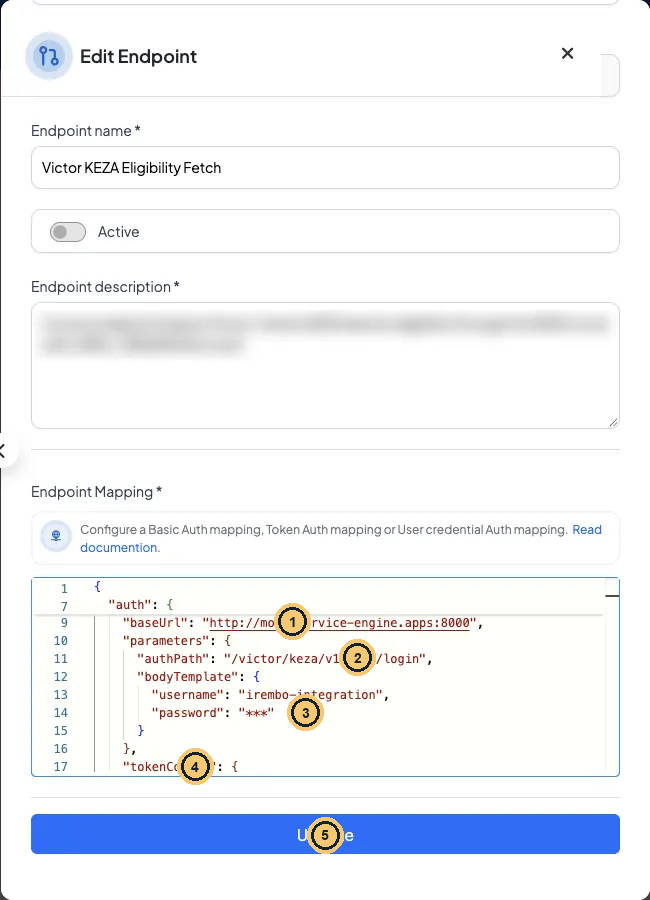
The saved auth block in the portal editor (description blurred)
- baseUrl: where the login lives.
- authPath + bodyTemplate: the login request.
- Saved secrets come back as *******. Leave them as they are to keep the stored password.
- tokenConfig follows: storageKey, headerName, tokenPrefix, expiryBuffer, extractPath.
- Update saves the mapping.
¶ What the engine does with the auth block
On every call to this endpoint:
¶ Step · 1 · Look in the token cache
Is there a token stored under VICTOR_KEZA_TOKEN? If yes and it is younger than expiryBuffer (300 s), reuse it and skip to step 4.
¶ Step · 2 · Log in
POST {"username":"irembo-integration","password":"Keza@2026"} (training value; with "${KEZA_PASSWORD}" the engine first replaces the placeholder with the environment value) to http://mock-service-engine.apps:8000/victor/keza/v1/auth/login.
¶ Step · 3 · Extract and cache
Read data.token from the answer and store it under the storage key for 300 s.
¶ Step · 4 · Call the partner
Add Authorization: Bearer keza-victor-token-7f3a and call the endpoint URL with the query built by the mapping.
Press Save. The portal shows “Success! Endpoint has been created”. If the code already exists you get “Endpoint with this code already exists”.
Gotcha · Choose the code, adapter and partner carefully
Endpoint adapter, Endpoint code and Partner cannot be changed after saving, and endpoints cannot be deleted. A typo means a new endpoint. The code must be 5–50 characters of letters, digits,
_or-.
¶ Check yourself
A colleague forgets the whole auth block and calls the endpoint for Aline. Using the mock from Lesson 1.4, what does KEZA (the mock) answer?
- A. 200 ELIGIBLE, because the query is correct
- B. 404 LEARNER_NOT_FOUND from rule 3
- C. Nothing: the portal will not save it
- D. 401 from the Otherwise card
Show the answer
D. Every rule starts with the Authorization condition, so a request without the header can only reach Otherwise → 401. The portal happily saves mappings without auth.
¶ Check yourself
Two endpoints for two different partners both use storageKey "PARTNER_TOKEN". What happens?
- A. Nothing: each endpoint keeps its own cache
- B. They share one cached token across both partners
- C. The second endpoint cannot be saved
- D. The engine adds the endpoint code to the key
Show the answer
B. The storage key is a global cache key, so one partner can receive the other’s token. Always make it unique per partner credential, e.g. VICTOR_KEZA_TOKEN.
Your turn · create your endpoint
- Endpoint adapter: FMAPPING (the endpoint is used on a form).
- Endpoint code:
${YOUR_FIRST_NAME}_KEZA_ELIGIBILITY_FETCH- Endpoint url:
http://mock-service-engine.apps:8000/${your_first_name}/keza/v1/eligibility- authPath:
/${your_first_name}/keza/v1/auth/login; storageKey:${YOUR_FIRST_NAME}_KEZA_TOKENReplace every variable with your first name before saving: Aline would save
ALINE_KEZA_ELIGIBILITY_FETCHand…/aline/keza/v1/eligibility. A literal$in the URL is rejected, and a code with a typo is permanent. The password stays the training literal here, because noKEZA_PASSWORDvariable is defined on staging for your prefix; in production you would use"${KEZA_PASSWORD}".
← 1.4 Your first mock: fake KEZA login + eligibility · 1.6 Call it and read the result →