¶ Why a scheduled job?
Some partner data is not asked for per application: it must already be in Irembo when the applicant opens the form. Notary appointment slots are the real example on staging. Every week the job MINIJUST_FETCH_MINIJUST_AVAILABILITY pulls the notaries’ availability from MINIJUST with a FETCH endpoint, and pushes it with a PUSH endpoint into the Irembo slot schedule. Applicants then pick a slot in the form. In this lesson you build the same pattern for KEZA: every morning, pull the next 14 days of exam sessions for one training centre into the Irembo exam schedule.
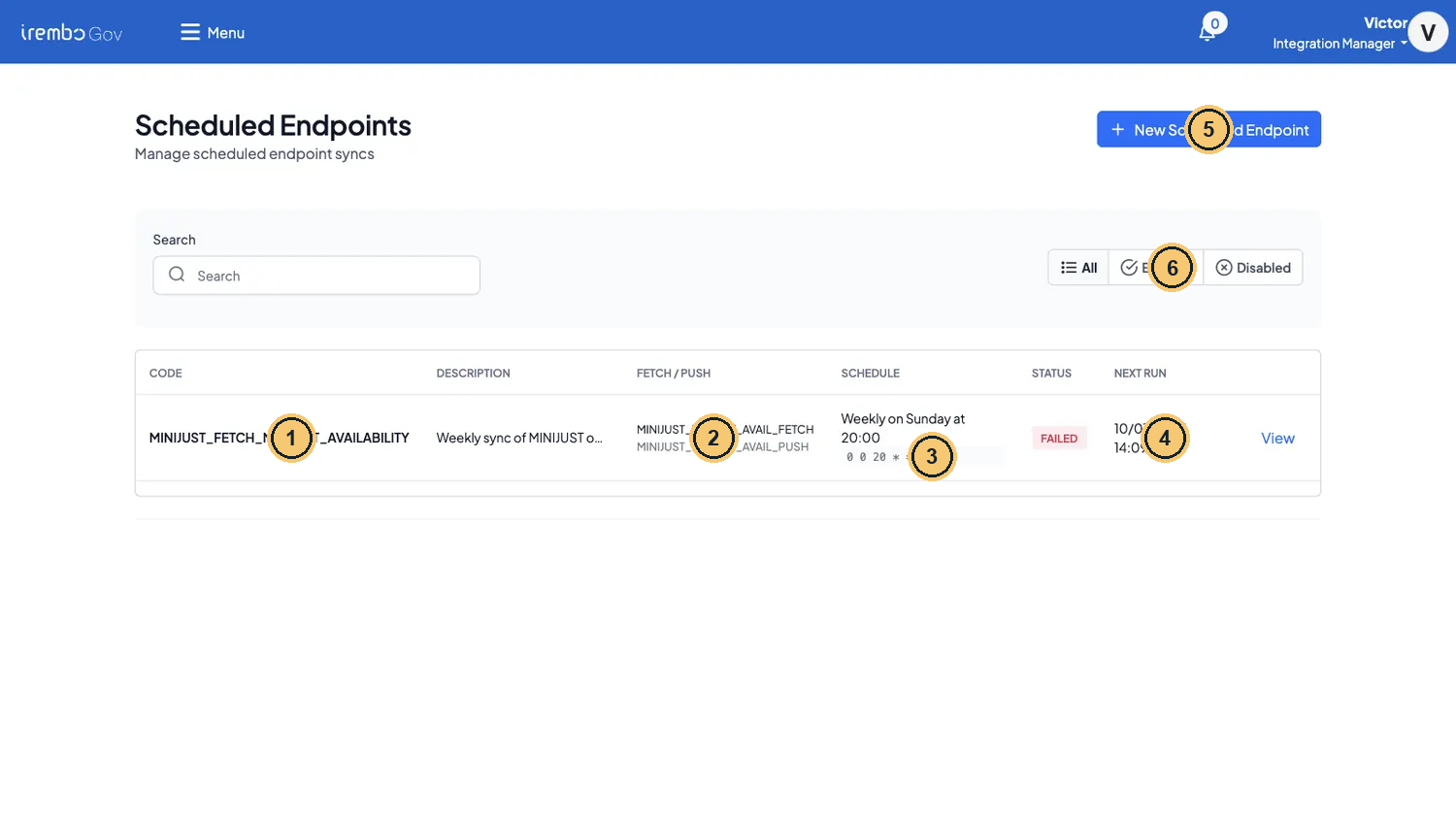
Scheduled Endpoints on staging: the real MINIJUST notary-availability job
- MINIJUST_FETCH_MINIJUST_AVAILABILITY: one FETCH and one PUSH endpoint on a cron.
- FETCH / PUSH: the two ordinary endpoints the job chains.
- Weekly on Sunday at 20:00 →
0 0 20 * * 0: six fields, seconds first, UTC. - Next run is in the past: on staging the cron never fires (the scheduler switch is off).
- New Scheduled Endpoint needs the JOB permission.
- All / Enabled / Disabled: a job is disabled after 5 failures in a row.
¶ What one run does
A job (called Scheduled Endpoint in the portal) is one FETCH endpoint, one PUSH endpoint, a cron and a set of inputs. There is no new adapter: you reuse FMAPPING and PMAPPING. Each run:
¶ Step · 1 · Resolve the inputs
"today" and "today + 14 days" become real dates (yyyy-MM-dd, UTC date). Only top-level strings are resolved. A string that starts with $ is JSONata over {today, now}. The result is saved on the run as Resolved inputs.
¶ Step · 2 · Fetch
The engine calls the FETCH endpoint with the resolved inputs as its input. This happens inside the engine: no gateway and no Irembo token. The FETCH endpoint’s own partner authentication, if any, still runs.
¶ Step · 3 · Count the rows
The engine counts the top-level array of the canonical response, or the first array field (here data). 0 rows: the run stops without pushing and still ends SUCCESS.
¶ Step · 4 · Push
The PUSH endpoint receives {"data": <canonical fetch response>, "scheduleCode": …, "idempotencyKey": …}. So the rows are at data.data in the PUSH mapping.
¶ Step · 5 · Count the result
The engine reads top-level numbers in the PUSH response: rowsCreated / created / slotsCreated / inserted for new, rowsUpdated / updated / slotsUpdated / slotsUpserted for upd.
Gotcha · You need the JOB permission
Scheduled Endpoints only appears in the menu, and New Scheduled Endpoint only works, when your account has the JOB grants. Without them the portal says “You do not have permission to CREATE this JOB.” Ask for them with the service-desk form from What you need in the Welcome lesson. You can also open
/dashboard/jobsdirectly to check.
¶ Step 1 · The KEZA partner mock and the Irembo receiver mock
KEZA exposes GET /keza/v1/exam-sessions?centerCode=&from=&to=, and it refuses calls without the X-Channel: IREMBO header. On the Irembo side, a second mock stands in for the schedule receiver. The real receiver is an internal service-engine route that you cannot reach from the gateway (see In real life below).
¶ Mocks → New Mock · VICTOR_KEZA_EXAM_SESSIONS
1 · Request: GET /victor/keza/v1/exam-sessions
2 · Responses (the first matching rule wins)
Rule 1 · Kacyiru Digital Hub sessions
| Match on | Key | Operator | Value | |
|---|---|---|---|---|
| If | Header | X-Channel | equals | IREMBO |
| and | Query param | centerCode | equals | KZ-GSB-01 |
Respond with 200 Body type jsonDynamic response ON
{
  "centerCode": "KZ-GSB-01",
  "centerName": "Kacyiru Digital Hub",
  "from": "{{request.query.from}}",
  "to": "{{request.query.to}}",
  "sessions": [
    {
      "sessionId": "KZX-GSB01-AM",
      "examDate": "{{request.query.from}}",
      "startTime": "09:00",
      "endTime": "11:00",
      "room": "ROOM-A",
      "roomName": "Room A",
      "seatsLeft": 20
    },
    {
      "sessionId": "KZX-GSB01-PM",
      "examDate": "{{request.query.from}}",
      "startTime": "14:00",
      "endTime": "16:00",
      "room": "ROOM-A",
      "roomName": "Room A",
      "seatsLeft": 12
    },
    {
      "sessionId": "KZX-GSB01-LAST",
      "examDate": "{{request.query.to}}",
      "startTime": "09:00",
      "endTime": "11:00",
      "room": "ROOM-B",
      "roomName": "Room B",
      "seatsLeft": 0
    }
  ]
}
Rule 2 · Any other centre (no sessions)
| Match on | Key | Operator | Value | |
|---|---|---|---|---|
| If | Header | X-Channel | equals | IREMBO |
Respond with 200 Body type jsonDynamic response ON
{
  "centerCode": "{{request.query.centerCode}}",
  "from": "{{request.query.from}}",
  "to": "{{request.query.to}}",
  "sessions": []
}
Otherwise — when no rule above matches
Respond with 400 Body type json
{
  "code": "MISSING_CHANNEL",
  "message": "Header X-Channel is required."
}
3 · Label
| Field | Value |
|---|---|
| Name | Victor KEZA Exam Sessions |
| Code | VICTOR_KEZA_EXAM_SESSIONS |
| Service | KEZA |
| Category | victor-course |
| Active | ✔ served by the mock server right away |
- Rule 1 answers Kacyiru Digital Hub (KZ-GSB-01) with 3 sessions. Dynamic response copies
fromandtofrom the query into the body. - Rule 2: any other centre gets an empty
sessionslist. The job then stops before the push. - Otherwise (no X-Channel header): 400 MISSING_CHANNEL. You will use this for the failure drill.
¶ Mocks → New Mock · VICTOR_IREMBO_EXAM_SCHEDULE
1 · Request: POST /victor/irembo/v1/schedules/bulk-create
2 · Responses (the first matching rule wins)
Rule 1 · Rows accepted for a schedule
| Match on | Key | Operator | Value | |
|---|---|---|---|---|
| If | Query param | scheduleCode | equals | VICTOR_KEZA_EXAMS |
Respond with 200 Body type jsonDynamic response ON
{
  "responseCode": "SCHEDULE_BULK_CREATED",
  "message": "Bulk-create completed",
  "data": {
    "scheduleCode": "{{request.query.scheduleCode}}",
    "rowsReceived": 3,
    "groupTypesUpserted": 1,
    "groupsUpserted": 2,
    "timeRangesUpserted": 3,
    "slotsUpserted": 3
  }
}
Otherwise — when no rule above matches
Respond with 404 Body type json
{
  "responseCode": "SCHEDULE_NOT_FOUND",
  "message": "No schedule with this code."
}
3 · Label
| Field | Value |
|---|---|
| Name | Victor Irembo Exam Schedule (bulk-create stand-in) |
| Code | VICTOR_IREMBO_EXAM_SCHEDULE |
| Service | KEZA |
| Category | victor-course |
| Active | ✔ served by the mock server right away |
- Accepts the rows for
?scheduleCode=VICTOR_KEZA_EXAMSand answers with a bulk-create summary nested under data, exactly like the real receiver. - Any other schedule code: 404 SCHEDULE_NOT_FOUND. The real receiver does the same when the schedule was never set up by the organisation.
¶ Step 2 · The FETCH and PUSH endpoints
Create both endpoints the way you did in Modules 2 and 3. The FETCH mapping turns KEZA’s sessions into the canonical availability rows that the Irembo schedule expects.
¶ Endpoints → New Endpoint · FETCH leg
| Field | Value | |
|---|---|---|
| **Endpoint adapter *** | FMAPPING (fetch) |
locked after save |
| **Endpoint code *** | VICTOR_KEZA_EXAM_SESSIONS_FETCH |
locked after save |
| **Endpoint url *** | http://mock-service-engine.apps:8000/victor/keza/v1/exam-sessions |
|
| **Endpoint type *** | FETCH (set by the adapter) |
|
| **Endpoint name *** | Victor KEZA Exam Sessions |
|
| **Partner *** | KEZA |
locked after save |
| Active | ON |
|
| **Endpoint description *** | Victor course: pull KEZA exam sessions for a centre and date window (scheduled job fetch leg). |
**Endpoint Mapping ***
{
  "method": "GET",
  "headers": { "X-Channel": "IREMBO" },
  "query": {
    "centerCode": centerCode,
    "from": from,
    "to": to
  },
  "response": {
    "transform": {
      "data": [sessions.{
        "groupType": { "code": $$.centerCode, "name": $$.centerName },
        "group": { "code": room, "name": roomName },
        "from": examDate & "T" & startTime & ":00+02:00",
        "to": examDate & "T" & endTime & ":00+02:00",
        "capacity": seatsLeft
      }]
    }
  }
}
- The partner header. Forget it and every run fails with 400 (the drill below).
centerCode,fromandtoare the job’s resolved inputs: the job input is the mapping input.- One canonical row per session:
groupType= the centre,group= the room.$$is the root of the partner body. - Times become full ISO date-times with the Kigali offset
+02:00.
¶ Endpoints → New Endpoint · PUSH leg
| Field | Value | |
|---|---|---|
| **Endpoint adapter *** | PMAPPING (push) |
locked after save |
| **Endpoint code *** | VICTOR_IREMBO_EXAM_SCHEDULE_PUSH |
locked after save |
| **Endpoint url *** | http://mock-service-engine.apps:8000/victor/irembo/v1/schedules/bulk-create |
|
| **Endpoint type *** | PUSH (set by the adapter) |
|
| **Endpoint name *** | Victor Irembo Exam Schedule |
|
| **Partner *** | KEZA |
locked after save |
| Active | ON |
|
| **Endpoint description *** | Victor course: push pulled exam sessions into the Irembo exam schedule (scheduled job push leg). |
**Endpoint Mapping ***
{
  "method": "POST",
  "query": { "scheduleCode": scheduleCode },
  "body": data.data,
  "response": { "transform": data }
}
scheduleCodecomes from the job inputs: the engine copies it into every push payload.data.data: the job wraps the fetch result indata, and your FETCH transform put the rows indatatoo.- Flatten the summary. The receiver nests its counters under
data. Without this transform the run shows new 0 / upd 0 even when rows were saved.
¶ Step 3 · Create the scheduled endpoint
Open Scheduled Endpoints (or /dashboard/jobs) and click New Scheduled Endpoint.
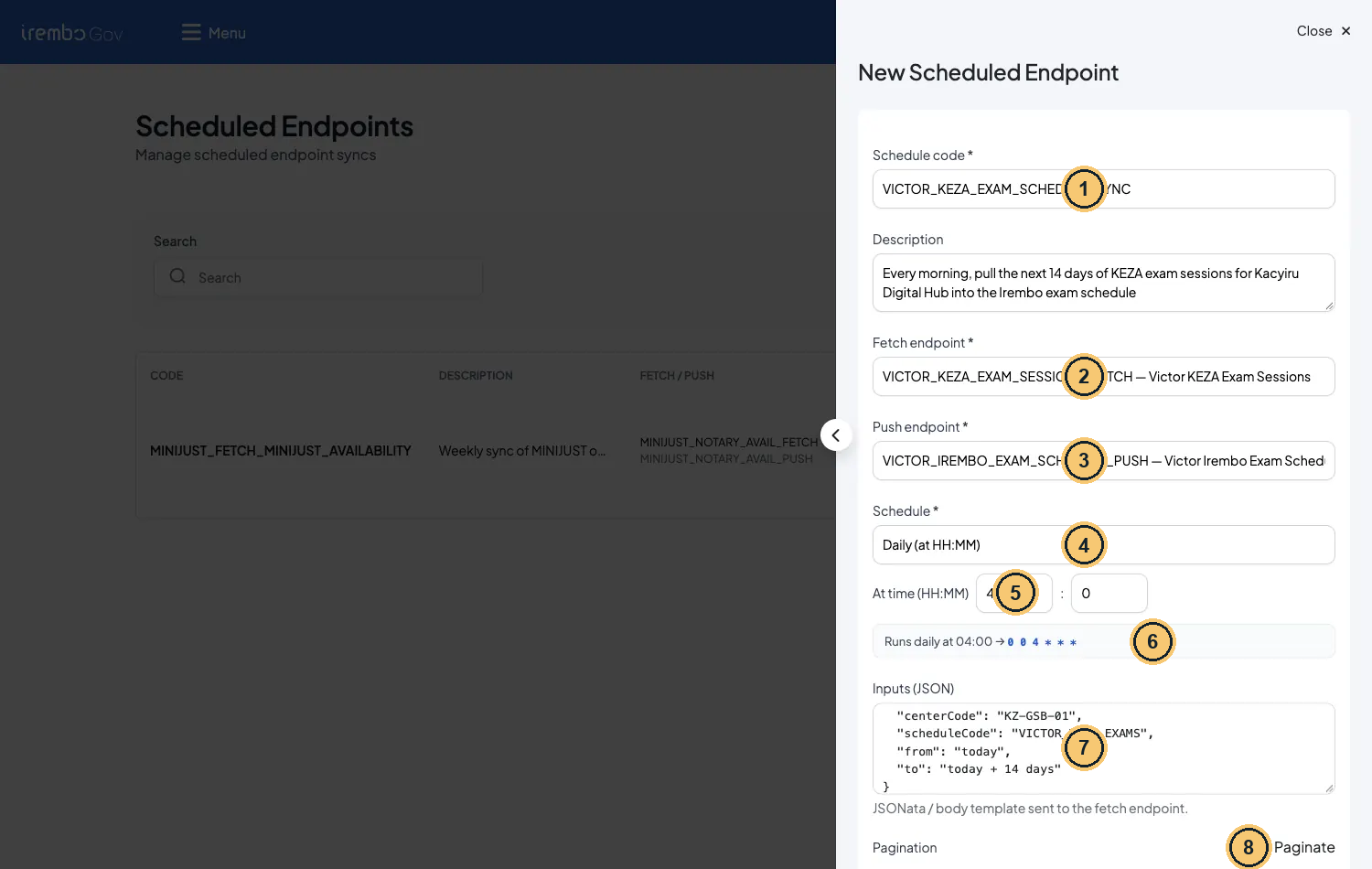
New Scheduled Endpoint, filled for the KEZA exam schedule
- Schedule code: upper case, at most 50 characters.
- Fetch endpoint: type ahead and pick your FETCH code.
- Push endpoint: your PUSH code.
- Schedule: every N minutes, hourly, daily, weekly, monthly or Advanced (raw cron).
- At time 4 : 0 is 04:00 UTC = 06:00 in Kigali.
- Preview: the summary has no time zone.
- Inputs (JSON): resolved at each run, then sent to the FETCH mapping.
- Paginate off: one fetch per run.
New Scheduled Endpoint: the values used on staging
| Field | Value | Why |
|---|---|---|
| Schedule code * | VICTOR_KEZA_EXAM_SCHEDULE_SYNC | Upper case, at most 50 characters (the database limit) |
| Description | Every morning, pull the next 14 days of KEZA exam sessions… | Shown in the list: say what, for whom, how often |
| Fetch endpoint * | VICTOR_KEZA_EXAM_SESSIONS_FETCH | Type-ahead on existing endpoints: pick your FETCH code (the list is not filtered by type) |
| Push endpoint * | VICTOR_IREMBO_EXAM_SCHEDULE_PUSH | Type-ahead again: pick your PUSH code |
| Schedule * | Daily (at HH:MM), At time 4 : 0 | The hour you type is UTC: 04:00 UTC = 06:00 in Kigali |
| Inputs (JSON) | Sent to the FETCH mapping after resolution | |
| Pagination | Off | One fetch per run. Turn it on only when the partner pages (see Limits) |
Your tech notes · Read the preview line, then add two hours
The preview says *“Runs daily at 04:00 → 0 0 4 * * ” with no time zone. The stored cron has six fields (seconds first) and is evaluated in UTC:
0 0 4 * * *. But Next run, Last run and the run times are shown in your browser’s time zone: 01/10/2026 06:00. For 06:00 in Kigali, type 04:00. Other frequencies: every N minutes, hourly, weekly on chosen days, monthly, or Advanced (a raw 6-field cron).
¶ Step 4 · Run now and read the run
Do not wait for 06:00. On the details page click Run now and confirm. The run starts at once, in addition to the schedule. The table refreshes within about 30 seconds.
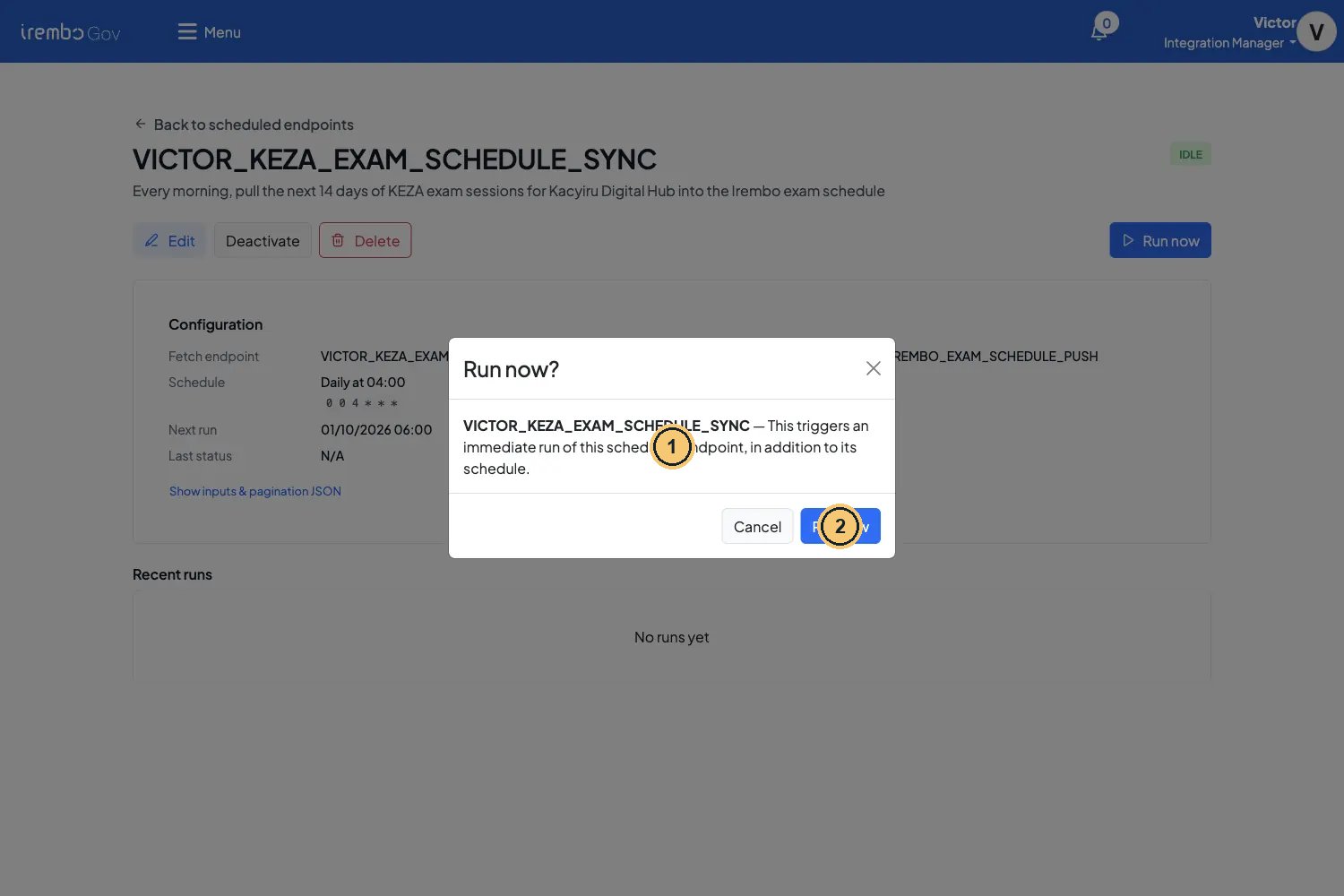
Run now asks for confirmation
- An extra run: after a success Next run stays on the cron; a failure moves it (backoff).
- Confirm. A second click while a run is RUNNING returns 409.
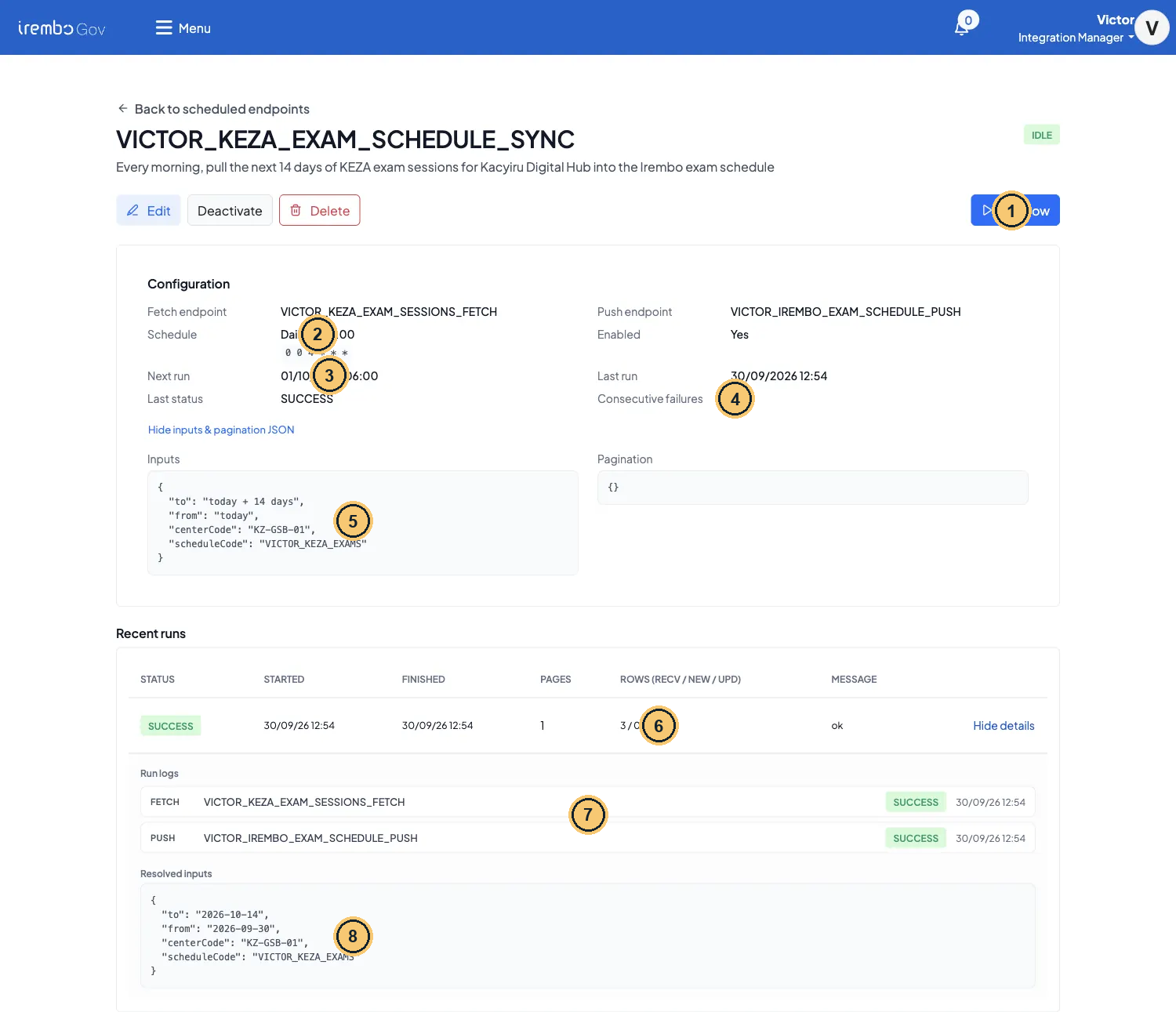
The first run, with View details open
- Run now: start a run immediately.
- Daily at 04:00 /
0 0 4 * * *: the cron, in UTC. - Next run in your time zone: 01/10/2026 06:00 in Kigali.
- Consecutive failures: 0 after a success.
- Inputs as saved: the words today and today + 14 days.
- SUCCESS · 1 page · 3 received / 0 new / 3 updated · ok.
- Run logs: the FETCH and PUSH Request rows of this run.
- Resolved inputs: the real dates used by this run.
Recent runs
| Column | First run | What it means |
|---|---|---|
| Status | SUCCESS | Or FAILED, or CAPPED (hit Max pages). RUNNING while in progress |
| Pages | 1 | Pushed pages. 0 when the fetch returned no rows |
| Rows (recv / new / upd) | 3 / 0 / 3 | recv = rows fetched and pushed; new / upd = the receiver’s summary (slotsUpserted counts as upd) |
| Message | ok | On failure: the error code, e.g. PARTNER_ERROR_FETCH-VICTOR_KEZA_EXAM_SESSIONS_FETCH |
Gotcha · Staging never fires the cron: use Run now
Scheduled runs need a platform switch (
scheduled.jobs.enabled). It is off on staging: at the time shown in Next run nothing happens. Run now works anyway. Where the switch is on, the job runs on its cron: ask the platform team before you rely on it in another environment.
¶ Run it again today: 3 / 0 / 0
Click Run now a second time on the same day. The run is SUCCESS with 3 / 0 / 0. Nothing is broken: the engine built the same idempotency key as the first run, found the successful push and returned its cached answer without calling the receiver again.
The push key of page 0, shown on three lines (…|F for the fetch)
VICTOR_KEZA_EXAM_SCHEDULE_SYNC
|centerCode=KZ-GSB-01;from=2026-09-30;scheduleCode=VICTOR_KEZA_EXAMS;to=2026-10-14
|p0|P
- Job code.
- The sorted resolved inputs. The dates change every UTC day, so tomorrow’s 06:00 run pushes again. To force a real re-push today, change an input, for example add
"runTag": "2". - The page and the leg: P push, F fetch. The FETCH leg reuses its Request row too, but it still calls the partner each time.
¶ Failure drill: a missing header
Edit the FETCH mapping, remove the "headers" line and click Run now. The mock answers 400 MISSING_CHANNEL, the fetch fails, and the run is FAILED.
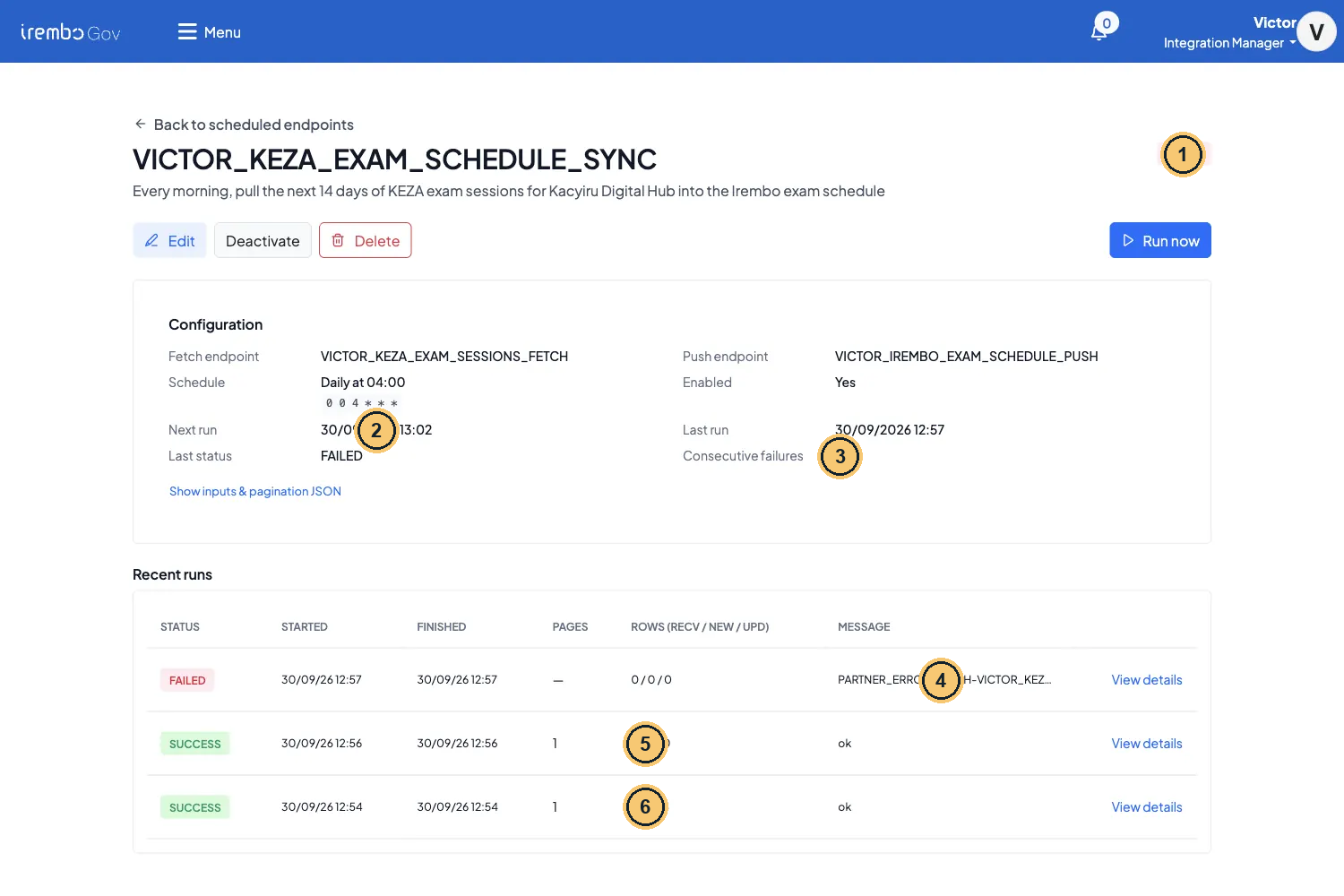
After the failure drill: FAILED, backoff and the earlier runs
- Status pill: FAILED right after a failed run, IDLE after a success, DISABLED after 5 failures in a row.
- Next run 13:02: 5 minutes after the 12:57 failure (backoff), not the 06:00 cron.
- Consecutive failures 1. At 5 the job is disabled.
- Message: the error code PARTNER_ERROR_FETCH-VICTOR_KEZA_EXAM_SESSIONS_FETCH.
- The second run of the day: 3 / 0 / 0, the push was not resent (same key).
- The first run: 3 / 0 / 3.
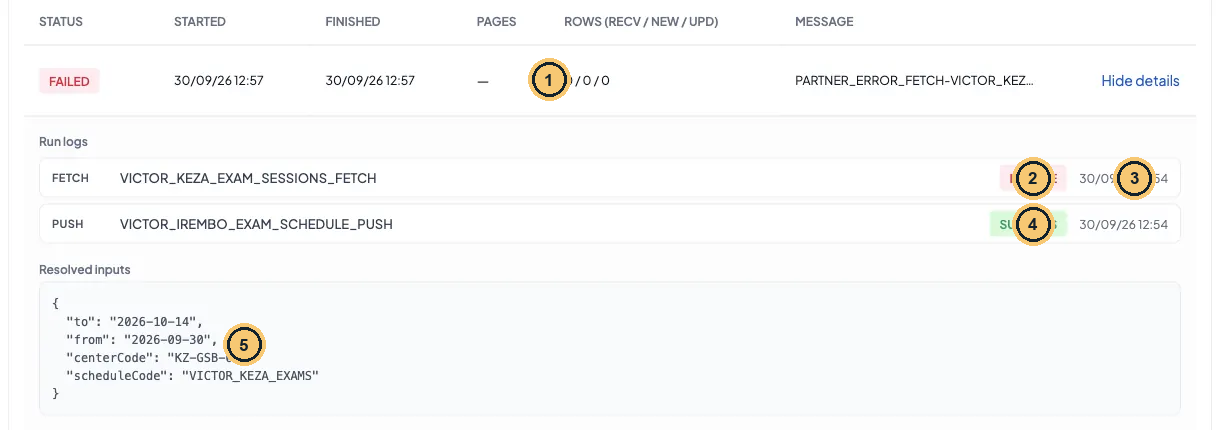
View details of the failed run
- The failed run: Pages — and 0 / 0 / 0, nothing was pushed.
- FETCH FAILURE: KEZA answered 400 MISSING_CHANNEL.
- 12:54 is the Date of the reused row from an earlier run; the FAILURE status is this run’s.
- PUSH SUCCESS is the earlier push of the day (latest row per page). This run pushed nothing.
- Resolved inputs: the same dates, so the same idempotency key.
Backoff and auto-disable
| After failure | Next run moves to | Note |
|---|---|---|
| 1 | now + 5 min | Consecutive failures 1 (the drill above: Next run 13:02 after a 12:57 failure) |
| 2 | now + 10 min | Run now failures count too |
| 3 | now + 20 min | |
| 4 | now + 40 min | The engine caps backoff at 1 hour, but the 5th failure disables the job first |
| 5 | — | The job is DISABLED (Enabled = No). Fix the cause, then Edit → Enabled on: the counter resets |
Put the header back and Run now: a SUCCESS resets Consecutive failures to 0 and the job returns to its cron. On staging the backoff time will not fire by itself either (the switch is off).
Gotcha · A retry on the same day reuses the FAILURE row
The fetch key is the same all day, so after a failure the next run reuses the same Request row (Kibana: “Duplicate detected: returning existing request … (status=FAILURE)”). The partner is still called with your current mapping. So a row in Requests can carry the Date or Status of an earlier run of the day, not only your retry. Use the run table and Kibana (the “Duplicate detected” line) as the record of the retry itself.
¶ When the partner is slow: the timeout
A job calls the partner with a 60-second read timeout. On a day the staging mock server was overloaded, every run failed after exactly one minute. Started and Finished were 61 s apart, and the message was the same PARTNER_ERROR_FETCH code as for a 400. The two only differ in the logs.
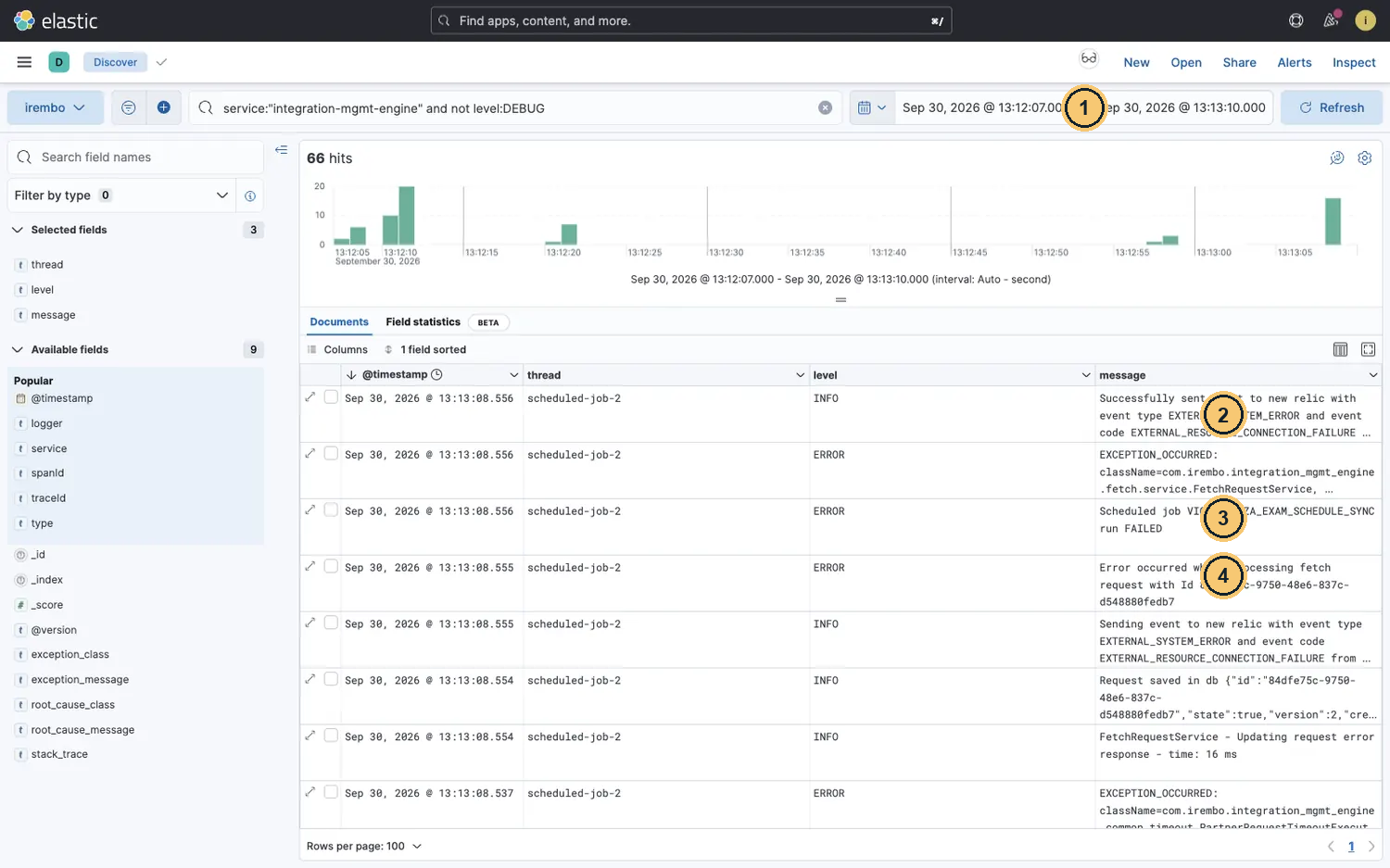
Kibana: the minute of a timed-out run (engine lines above DEBUG)
- Time range = Started to Finished of the run: 61 seconds, the read timeout.
- New Relic event EXTERNAL_RESOURCE_CONNECTION_FAILURE.
- Scheduled job … run FAILED.
- Error occurred while processing fetch request with Id …: search that id to see the Read timed out line.
A timeout, oldest line first (Kibana lists newest first: read it bottom-up)
| Logger | Line (oldest first) |
|---|---|
| PartnerRequestTimeoutExecutorImpl | I/O error on GET request for “http://mock-service-engine.apps:8000/victor/keza/v1/exam-sessions”: Read timed out |
| FetchRequestService | Error occurred while processing fetch request with Id |
| New Relic | event EXTERNAL_RESOURCE_CONNECTION_FAILURE |
| ScheduledJobService | Scheduled job VICTOR_KEZA_EXAM_SCHEDULE_SYNC run FAILED |
Do not change the mapping for a timeout. Check the partner, wait and Run now again. Run now keeps adding to Consecutive failures while the partner is down, so stop after two or three tries.
¶ The evidence in Requests
Scheduler calls are ordinary Requests. Filter Endpoint on your FETCH or PUSH code.
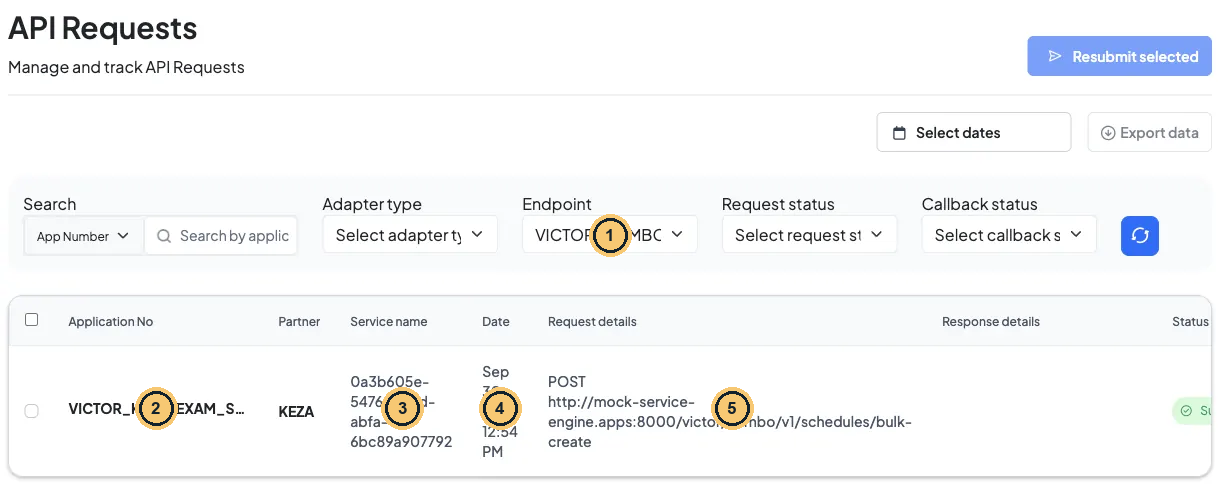
Requests filtered on the PUSH endpoint
- Endpoint filter: pick your PUSH (or FETCH) code.
- Application No = job code | page (…|p0). FETCH rows leave it empty.
- Service name: a random id; no service is behind a job.
- Date 12:54: the only real push of the day. Same-day reruns returned the cached result.
- POST to the receiver’s bulk-create path. Response details stay empty for job pushes.
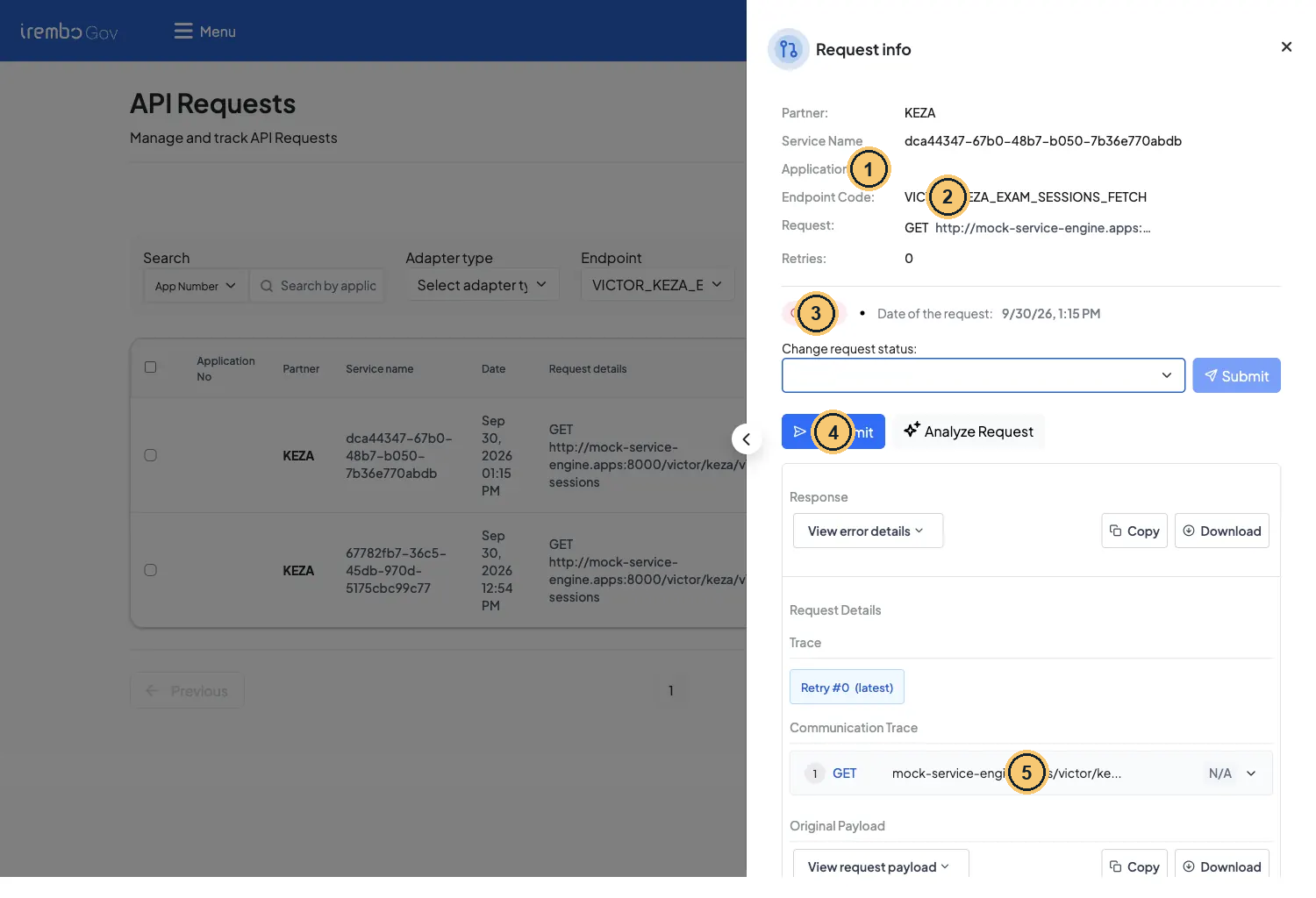
Request info of a job FETCH row
- Application no: empty for job fetches.
- Endpoint Code: your FETCH endpoint.
- Status and Date of this row. A same-day retry can reuse a row, so check the run table too.
- To retry a job, do not start here: use Run now on the job page.
- Communication Trace: the GET with centerCode, from and to.
Reading job rows in Requests
| Field | FETCH row | PUSH row |
|---|---|---|
| Application No | empty | VICTOR_KEZA_EXAM_SCHEDULE_SYNC|p0 (job code | page) |
| Service name | a random id (no service behind a job) | a random id |
| Response | empty on success; a failed fetch shows the error text | empty for job pushes: read the counts in the run table |
| Date and Status | can belong to an earlier run: a same-day retry may reuse the row | same |
Your tech notes · Retry from the job, not from Requests
To retry a job, use Run now on the job page: it resolves the inputs again, runs both legs and updates the run table and the failure counter. The Requests page is for reading the evidence.
¶ Find a run in Kibana
Search the job code as free text, next to the engine service. Scheduler work runs on threads called scheduled-job-N.
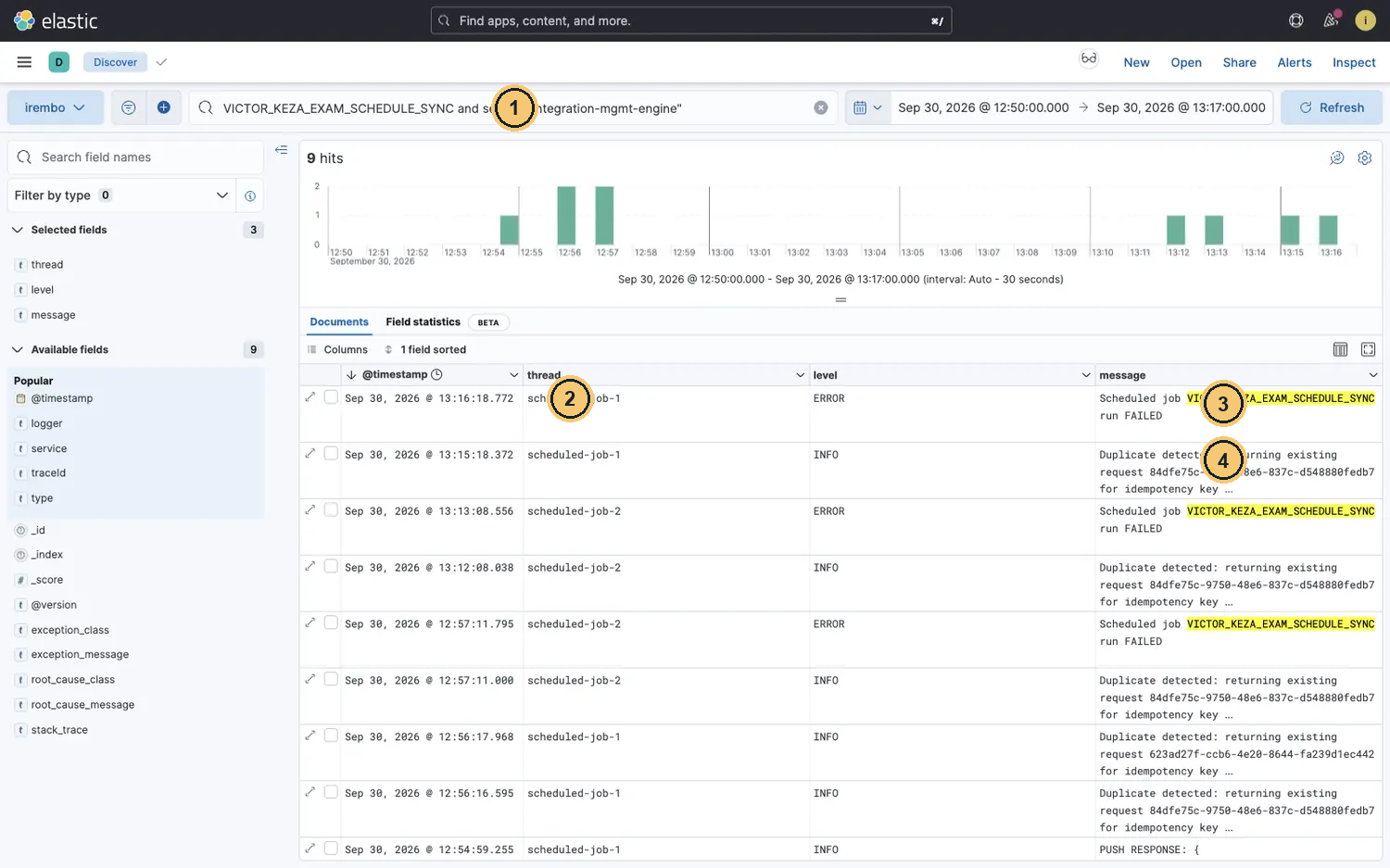
Kibana: every line that names the job
VICTOR_KEZA_EXAM_SCHEDULE_SYNC and service:"integration-mgmt-engine"- thread: scheduler work runs on scheduled-job-N.
- Scheduled job … run FAILED: one line per failed run.
- Duplicate detected: a same-day run reused the existing Request row.
Kibana Discover (data view irembo)
VICTOR_KEZA_EXAM_SCHEDULE_SYNC and service:"integration-mgmt-engine"
service:"integration-mgmt-engine" and thread:scheduled-job-* and message:"PUSH RESPONSE"
service:"integration-mgmt-engine" and thread:scheduled-job-* and not level:DEBUG
- Every run, plus “Duplicate detected” and “run FAILED” lines. A success has no “succeeded” line.
- The push leg of each run, with the callerId
VICTOR_KEZA_EXAM_SCHEDULE_SYNC|p0. - Everything a run did: set the time range from Started to Finished of the run (shown in local time, like Kibana).
Job limits
| Limit | Value |
|---|---|
| Run budget | 20 minutes per run, then FAILED |
| Pagination | Off = one fetch. On = the engine adds page and size to the inputs and stops on a short or empty page, or at Max pages (the run ends CAPPED). Your FETCH mapping must forward them, e.g. "query": {…, "page": page, "size": size}. Otherwise every page asks for the same rows and the run ends CAPPED |
| Run now while running | 409 SCHEDULED_JOB_ALREADY_RUNNING |
| Kept for | Runs 14 days (failed runs 60 days); Requests 7 days (failed 30 days). Keep your screenshots |
Your tech notes · In real life (MINIJUST)
The real PUSH endpoint points at the service engine’s internal
…/service/api/v1/internal/schedules/bulk-create?scheduleCode=…. That route is blocked at the gateway (403) and only works engine to engine. It accepts at most 1000 rows per call, so set the page size to 1000 or less. The organisation must first create the schedule (Org Portal → Slots and booking manager), or the push fails with 404. And the partner API key goes in the FETCH mapping as an environment variable, never as a literal.
¶ Check yourself
Your job must run at 05:15 in Kigali every day. What do you type in Daily, At time?
- A. 03:15
- B. 05:15
- C. 07:15
- D. 15:05
Show the answer
A. The hour you type is UTC. Kigali is UTC+2, so 05:15 Kigali = 03:15 UTC → cron 0 15 3 * * *.
¶ Check yourself
You click Run now twice on the same morning. The second run is SUCCESS with 3 / 0 / 0. Why?
- A. The receiver rejected the rows
- B. The partner returned no sessions
- C. The run hit the Max pages limit
- D. Same key: push not resent
Show the answer
D. The idempotency key (job, resolved inputs, page) is the same all day. The engine returned the cached push result: recv 3, new 0, upd 0.
¶ Check yourself
A job shows FAILED and Next run jumped 5 minutes ahead. What happens after four more failures in a row?
- A. It keeps retrying every 5 minutes
- B. It is disabled until re-enabled
- C. It switches to the mock URL
- D. Nothing: only cron runs count
Show the answer
B. Backoff grows 5, 10, 20, 40 minutes. At 5 consecutive failures (Run now included) the job is disabled. Re-enabling resets the counter.
Your turn · your own KEZA exam schedule job
- Create the mocks
${YOUR_FIRST_NAME}_KEZA_EXAM_SESSIONS(path/${your_first_name}/keza/v1/exam-sessions) and${YOUR_FIRST_NAME}_IREMBO_EXAM_SCHEDULE(path/${your_first_name}/irembo/v1/schedules/bulk-create), with the rules above. The receiver rule must match${YOUR_FIRST_NAME}_KEZA_EXAMS.- Point the endpoints at the mock host plus your paths:
http://mock-service-engine.apps:8000/${your_first_name}/keza/v1/exam-sessionsand…/${your_first_name}/irembo/v1/schedules/bulk-create(the same host as the Victor endpoints above).- Create
${YOUR_FIRST_NAME}_KEZA_EXAM_SESSIONS_FETCHand${YOUR_FIRST_NAME}_IREMBO_EXAM_SCHEDULE_PUSHwith the mappings above.- Create
${YOUR_FIRST_NAME}_KEZA_EXAM_SCHEDULE_SYNC, daily at 21:30 Kigali, with scheduleCode${YOUR_FIRST_NAME}_KEZA_EXAMS. Predict first: what cron will the preview show, and what will Next run show in your browser?- Run now. Then Run now again. Then do the failure drill and put the header back.
- Stretch: change centerCode to
KZ-NYR-01and predict Pages and Rows before you run.Done when your evidence pack has: the SUCCESS 3/0/3 run with its Resolved inputs; the 3/0/0 rerun with one sentence on why; the FAILED run and its Kibana “run FAILED” line; the PUSH row
…|p0in Requests. Clean up: click Deactivate on your job so it never runs where the scheduler is on.
← 6.4 Endpoint lifecycle, mock switching and safe change · 6.6 Assignment: Commercial Premise Trading Licence integrations →