¶ From mock to production, safely
So far every reference endpoint pointed straight at the mock host. On staging and sandbox the portal offers a cleaner pattern: the endpoint keeps the real partner URL, you add a Mock url, and a Use mock switch chooses between them. Production has none of these mock controls.
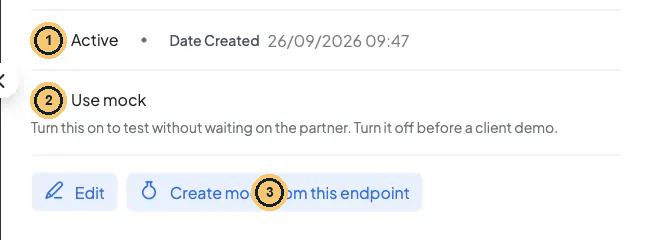
Use mock and Create mock from this endpoint
- Active switch.
- Use mock: needs a Mock url first.
- Create mock from this endpoint: opens a prefilled New Mock (does not set the Mock url).
¶ Switch an endpoint to its mock (staging / sandbox only)
Endpoints → open the endpoint:
¶ Step · 1 · Create the mock
Click Create mock from this endpoint. New Mock opens with the method and path of the endpoint URL, the name “ test data”, the partner as service and Take precedence over the built-in file stubs on. Add your rules and save. If a mock with that method and path already exists, its Edit window opens instead.
¶ Step · 2 · Set the Mock url
The button does not link the mock to the endpoint. Click Edit and fill Mock url with the mock host plus the same path, e.g. http://mock-service-engine.apps:8000/victor/keza/v1/eligibility. Update.
¶ Step · 3 · Turn on Use mock
In the details pane switch Use mock on: “Success! This endpoint now uses mock data”. With no Mock url you get “Set a mock url for this endpoint before enabling mock mode”.
¶ Step · 4 · Prove it
Run your curl and check the Communication Trace: the URL must be the mock host.
¶ Step · 5 · Turn it off
Switch Use mock off before a demo or go-live: “Success! This endpoint now calls the partner”.
Your turn · switch one endpoint to its mock and back
- Pick
${YOUR_FIRST_NAME}_KEZA_LEARNER_FETCH. Edit it: set Endpoint url to the real-looking partner URLhttps://api.keza.example/v1/learners/{nationalId}and Mock url tohttp://mock-service-engine.apps:8000/${your_first_name}/keza/v1/learners/{nationalId}(replace the variables with your first name). Update.- Call it for Aline with Use mock off. Predict first: what does the caller get? (A 500 PARTNER_ERROR or a timeout: the partner host does not exist.)
- Switch Use mock on and call again: 200 with Aline’s profile. In the Communication Trace the URL is now the mock host, and Matched-Stub-Name names your mock.
- Switch Use mock off again and put the Endpoint url back to the mock host so your later lessons keep working. Add both traces to your evidence pack.
Gotcha · Use mock swaps only the endpoint URL
The auth block still calls
auth.baseUrl. If it points at the real partner, your mock test still logs in to the partner, and fails if their login is down. Either mock the login too (as the reference endpoints do) or use an endpoint with TOKEN/BASIC auth for mock demos.
¶ Capture real answers as mock rules
Turn a real partner answer into a mock rule by hand: open Requests → View → Communication Trace, expand the call, use Copy URL for the path and Copy for the body, then paste both into a new rule on your mock. A newer portal version adds a Save this response as a mock button in the same place. It is not shown on staging today. When it arrives, it creates “
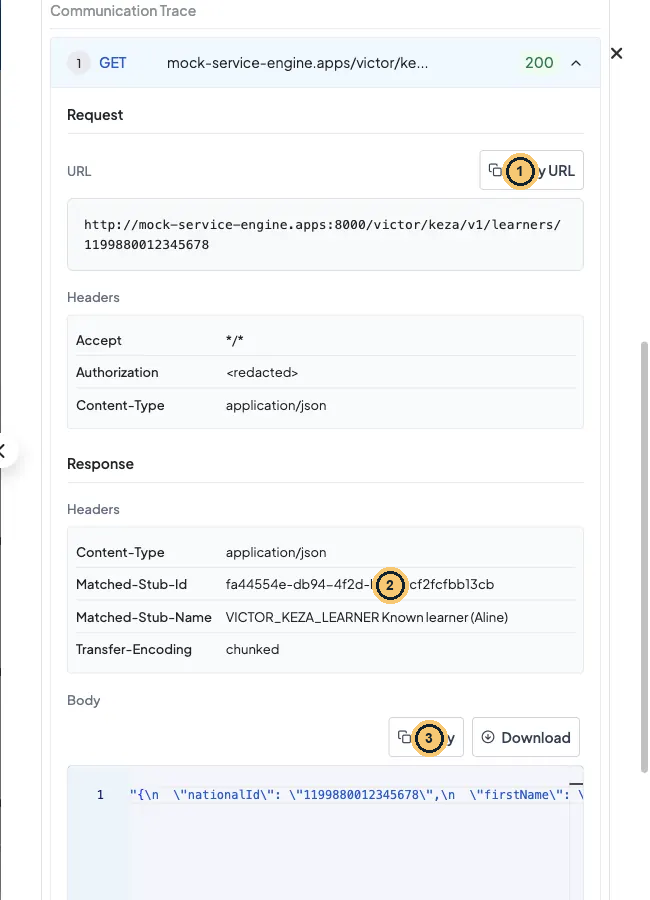
Communication Trace on staging: copy what the partner sent back
- Copy URL: the exact path for the mock rule.
- Matched-Stub-Id / Matched-Stub-Name: this call was already answered by a mock.
- Copy or Download the body and paste it into the rule response.
¶ Changing a live endpoint
Endpoints cannot be deleted, and the adapter, code and partner are fixed. Everything else can change, so change it carefully:
Safe change checklist
| Change | Risk | Safe way |
|---|---|---|
| Mapping edit | Every caller is affected at once | Test on a copy endpoint (…_V2) or on staging first; mapping test; then edit |
| URL change (go-live) | Wrong host = all calls fail | Prove the real URL with one controlled call; keep the old URL in your notes to roll back |
| Credentials rotation | The cached token lives until expiryBuffer ends | The platform team updates the environment variable; then change the storageKey (or wait for expiryBuffer) so the old token is not reused. Only a training literal is ever retyped in the mapping |
| Deactivate (Active switch off) | Not enforced by the engine: calls still run | To really stop traffic, remove the endpoint from the service configuration |
| Secrets per environment | Staging literals copied to production | Use whole-string "${NAME}" environment variables that the platform team defines per environment; check every name exists before go-live (a missing one fails every call) |
Your tech notes · Edit shows only if you have the right
On staging, access control is switched on. If you see View configuration instead of Edit, an empty adapter dropdown, or “You do not have permission to READ this ADAPTER”, your account lacks a grant. Ask the platform team; this is not a bug.
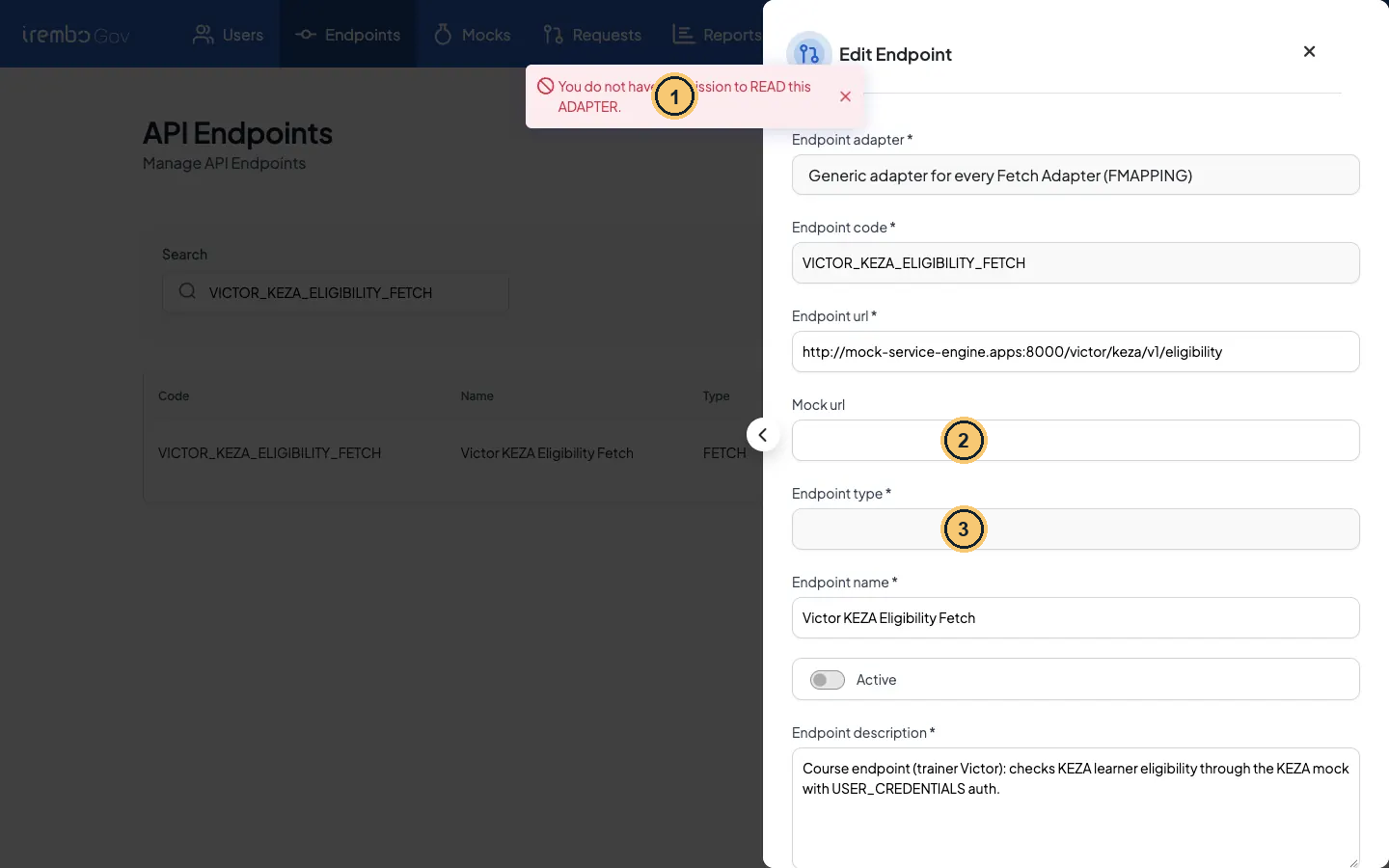
Edit Endpoint without the adapter grant
- Toast: “You do not have permission to READ this ADAPTER.”
- Mock url field (staging/sandbox).
- Endpoint type stays empty because the adapter could not be read: ask for the grant before editing.
¶ Check yourself
A colleague clicked Create mock from this endpoint, saved the mock and turned on Use mock, but gets “Set a mock url for this endpoint before enabling mock mode”. What was missed?
- A. Switching the new mock to Active on the Mocks page
- B. Filling the Mock url field on the endpoint
- C. Restarting the mock server after saving
- D. Adding an Otherwise response to the mock
Show the answer
B. Creating the mock does not wire it to the endpoint. The Mock url field must be filled first.
¶ Check yourself
You switch off Active on an endpoint during an incident. Calls keep reaching the partner. Why?
- A. The portal did not save the change
- B. Callers cache the endpoint for an hour
- C. The engine does not check Active at runtime
- D. The endpoint is still in Use mock mode
Show the answer
C. Active is a label for people, not a runtime switch. Stop traffic at the service configuration level.
← 6.3 Debug endpoints with Kibana logs · 6.5 Scheduled jobs: pull the KEZA exam schedule regularly →